
Job Costing for Manufacturing The Complete Beginner’s Guide
“Without accurate job costing, you’re essentially flying blind—you might think you’re profitable on every job, but some products could be secretly draining your business.” Who this article is for: Manufacturing business owners new to job costing Operations managers transitioning from process costing Custom manufacturers (make-to-order) Job shop owners Manufacturers implementing new accounting systems Students/professionals learning…
Table of Contents
Toggle"Without accurate job costing, you're essentially flying blind—you might think you're profitable on every job, but some products could be secretly draining your business."
Who this article is for:
- Manufacturing business owners new to job costing
- Operations managers transitioning from process costing
- Custom manufacturers (make-to-order)
- Job shop owners
- Manufacturers implementing new accounting systems
- Students/professionals learning manufacturing accounting
The Problem:
- Many small manufacturers don’t track costs by job
- Assume all jobs are profitable if overall business is profitable
- Discover too late that certain jobs/customers lose money
- Can’t make data-driven pricing decisions
Real-world scenario: “Custom Metal Fabricator thought they were profitable on all jobs. When they finally implemented job costing, they discovered their ‘best customer’ (highest volume) was actually their least profitable—every job lost money due to excessive rework and rush charges they weren’t billing for.”
What This Guide Covers:
- What job costing is and why it matters
- How job costing works (step-by-step)
- Setting up a job costing system
- Calculating job costs accurately
- Using job cost data for decisions
- Common mistakes and how to avoid them
- Software and tools to simplify the process
Who Should Use Job Costing:
- Custom manufacturers
- Made-to-order businesses
- Job shops
- Contract manufacturers
- Project-based manufacturing
- Any manufacturer with diverse products/customers
PART 1: JOB COSTING FUNDAMENTALS
Section 1.1: What is Job Costing?
Definition: Job costing (also called job order costing) is an accounting method that tracks all costs associated with a specific production job, project, or customer order. Instead of averaging costs across all products, you know exactly what each individual job costs to produce.
Simple Example:
Job #1234: Custom stainless steel enclosure for Customer A
– Direct Materials: $850
– Direct Labor: $420
– Manufacturing Overhead: $315
– TOTAL JOB COST: $1,585
You quoted: $2,200
Actual Profit: $615 (28% margin)
The Core Principle: Every expense that can be traced to a specific job is assigned to that job. This gives you the true cost and profit for each order.
Key Components Tracked:
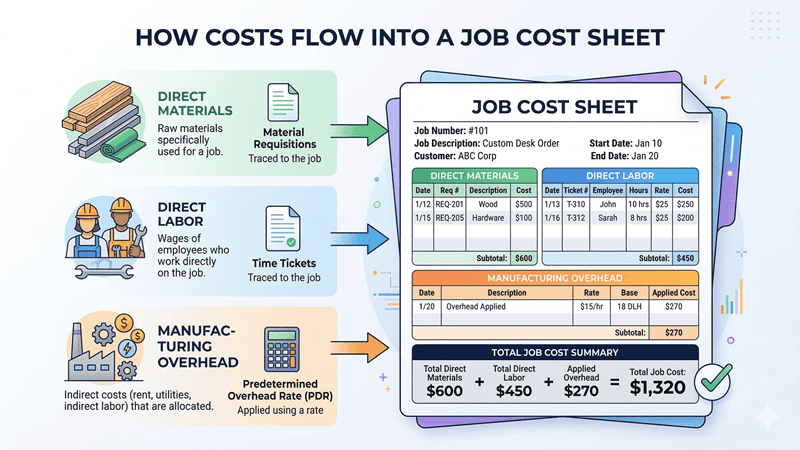
- Direct Materials: Raw materials used specifically for this job
- Direct Labor: Employee time spent working on this job
- Manufacturing Overhead: Allocated portion of indirect costs (utilities, rent, equipment depreciation, etc.)
Cost Flow Into a Job Sheet:
Section 1.2: Job Costing vs. Process Costing
When to Use Each Method:
Job Costing is for:
- Custom/unique products each time
- Made-to-order manufacturing
- Low to medium volume
- High product variety
- Examples: Custom machinery, aerospace components, custom furniture, print shops
Process Costing is for:
- Identical/homogeneous products
- Continuous production
- High volume, low variety
- Mass production
- Examples: Chemicals, food processing, oil refining, textiles
Comparison Table:
Factor | Job Costing | Process Costing |
Product Type | Custom/unique | Standardized/identical |
Production Volume | Low-medium | High |
Cost Tracking | By individual job | By department/process |
Complexity | Higher | Lower |
Unit Cost Calculation | After job complete | End of period (average) |
Best For | Job shops, custom mfg | Assembly lines, continuous flow |
Real Example: “Aircraft Component Manufacturer uses job costing because each component is made to specific customer specs. Their neighbor, a bolt manufacturer producing millions of identical bolts, uses process costing because every bolt is the same.”
Hybrid Approach: Some manufacturers use both:
- Standard products: Process costing
- Custom orders: Job costing
- Example: Furniture manufacturer with catalog items (process) and custom orders (job)
Self-Assessment Questions: Help readers determine which they need:
- Do you produce the same product repeatedly? (Process costing likely)
- Does each order have unique specifications? (Job costing likely)
- Can you trace materials to specific customer orders? (Job costing works)
- Do you need to quote prices before production? (Job costing helps)
Section 1.3: Why Job Costing Matters
Business Benefits:
- Accurate Pricing Decisions
- Know true cost before quoting
- Avoid underpricing (losing money on jobs)
- Avoid overpricing (losing bids to competitors)
- Build in appropriate profit margins
Example: “Before job costing: Manufacturer quoted based on ‘feel’ and competitor prices. Won lots of jobs but barely broke even.
After job costing: Discovered true costs varied wildly by job complexity. Raised prices on complex jobs (lost some low-margin business but increased profit 35%). Lowered prices on simple jobs (won more volume, improved economies of scale).”
- Identify Profitable vs. Unprofitable Work
- See which jobs make money
- Spot money-losing customers/products
- Make informed decisions about what work to pursue
Data Point: “Studies show 20% of customers often generate 80% of profits, while some customers actually destroy value. Without job costing, you can’t identify which is which.”
- Control Costs and Find Waste
- Compare estimated vs. actual costs
- Identify where costs exceed expectations
- Spot inefficiencies (excessive labor, material waste, rework)
Example: “Job costing revealed one operator took 3x longer than others on similar jobs. Investigation showed inadequate training. After training, labor costs on those jobs dropped 40%.”
- Improve Estimating Accuracy
- Historical job cost data improves future estimates
- Learn from past jobs what actually costs
- Reduce variance between quoted and actual costs
- Better Inventory Management
- Track work-in-process (WIP) by job
- Know exactly what materials are allocated to which jobs
- Reduce excess inventory and waste
- Financial Reporting Accuracy
- Accurate COGS (cost of goods sold)
- Proper WIP valuation
- Better gross margin reporting
- Meet GAAP requirements for larger companies
- Performance Measurement
- Track efficiency by job, operator, or department
- Set benchmarks and standards
- Reward high performers
- Identify training needs
The Cost of NOT Having Job Costing:
Real Story: “$8M custom manufacturer didn’t use job costing. Thought they had 25% gross margins. When they finally implemented job costing:
- Discovered actual margin: 12%
- Found 30% of jobs lost money
- Identified their largest customer was unprofitable (excessive rework not charged)
- One product line subsidizing another
Within 6 months:
- Exited unprofitable work
- Raised prices strategically
- Actual margins improved to 22%
- Profit increased $400K annually”
PART 2: HOW JOB COSTING WORKS
Section 2.1: The Job Cost Sheet
What It Is: The job cost sheet is the central document that accumulates all costs for a specific job from start to finish.
Essential Information on Every Job Cost Sheet:
Header Information:
- Job number (unique identifier)
- Customer name
- Job description
- Start date
- Completion date
- Quantity ordered
Cost Categories:
- Direct Materials
- List each material used
- Quantity
- Unit cost
- Total cost
- Date issued
- Material requisition number
- Direct Labor
- Employee name/ID
- Hours worked on this job
- Hourly rate (including burden)
- Total labor cost
- Date worked
- Time ticket/timesheet reference
- Manufacturing Overhead
- Predetermined overhead rate
- Allocation base (labor hours, machine hours, etc.)
- Overhead applied to this job
Summary Section:
- Total Direct Materials
- Total Direct Labor
- Total Manufacturing Overhead
- TOTAL JOB COST
- Cost per unit (total ÷ quantity)
- Selling price
- Gross profit
- Gross margin %
Sample Job Cost Sheet Template:
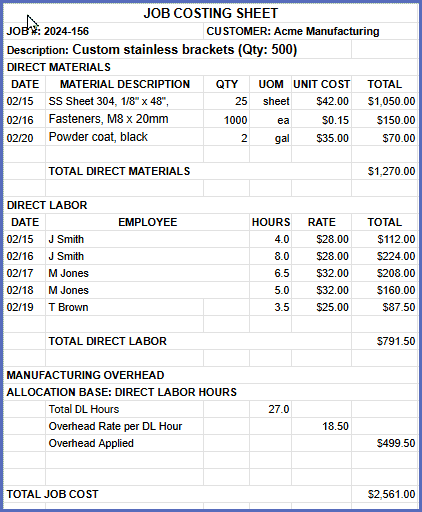
Cost Per Unit (÷500): $5.12
Selling Price (quoted): $4,500.00
Selling Price Per Unit: $9.00
———————————–
GROSS PROFIT: $1,938.50
GROSS MARGIN: 43.1%
How It’s Used:
- Created when job starts
- Updated as costs incurred
- Closed when job complete
- Analyzed for profitability
- Stored for future reference/estimating
Digital vs. Paper:
- Small shops: Excel or paper forms work
- Growing businesses: Job costing software recommended
- Integrated systems: ERP with built-in job costing
Section 2.2: Tracking Direct Materials
What Qualifies as Direct Materials: Raw materials and components that:
- Become part of the finished product
- Can be traced directly to a specific job
- Are significant enough to track individually
Examples:
- Steel plate for a custom enclosure
- Electronic components for a control panel
- Paint/coating for the finished product
- Shop rags (too small, indirect material)
- Machine lubricant (not part of product, overhead)
- Sandpaper (consumable, overhead)
The Process:
Step 1: Material Requisition When production needs materials:
- Fill out material requisition form
- Lists job number, material needed, quantity
- Warehouse/inventory clerk approves
- Materials issued from stock
Step 2: Record on Job Cost Sheet
- Add material description and cost
- Use standard cost or actual purchase cost
- Update job cost sheet immediately
Step 3: Track Material Usage
- Actual quantities used may differ from requisitioned
- Return unused materials to inventory
- Adjust job cost sheet for actual usage
- Investigate significant variances
Forms:
- Creates paper trail
- Prevents unauthorized material use
- Enables accurate job costing
- Required for audit trail
Implement Barcode/RFID Systems:
- Scan materials when issued
- Automatically updates job cost sheet
- Reduces data entry errors
- Real-time inventory visibility
Reconcile Regularly:
- Physical inventory counts
- Compare to system records
- Investigate discrepancies
- Adjust for waste/scrap
Track Scrap Separately:
- Normal scrap: Include in job cost
- Abnormal scrap: May expense separately
- Analyze scrap rates by job
- Continuous improvement opportunities
Example: “Job requires 100 ft of steel tubing at $3/ft = $300 budgeted.
Actual usage: 108 ft (due to cutting waste) Actual cost: $324
Job cost sheet shows $324 (actual) Variance report shows $24 over budget (8% waste) Investigation: Normal waste is 5%, this is high Root cause: New operator, training issue identified”
❌Common Mistakes:
- Not tracking materials at all (guessing costs)
- Using average costs instead of actual
- Forgetting to credit returns
- Not accounting for waste/scrap
- Delaying entry (forgetting what was used)
Section 2.3: Tracking Direct Labor
What Qualifies as Direct Labor: Labor that:
- Works directly on the product
- Can be traced to a specific job
- Transforms raw materials into finished goods
Examples:
- ✓ Machinist running CNC for Job #123
- ✓ Welder assembling components
- ✓ Assembly worker on specific order
- ✗ Supervisor overseeing multiple jobs (indirect)
- ✗ Maintenance worker fixing equipment (indirect)
- ✗ Quality inspector (usually indirect unless job-specific)
The Process:
Step 1: Time Tracking Employees record time spent on each job:
Methods:
- Paper timesheets: Simple but error-prone
- Time clocks with job numbers: Punch in/out by job
- Digital time tracking: Apps, tablets, barcode scanners
- ERP systems: Integrated job time entry
Step 2: Calculate Labor Cost For each time entry:
- Hours worked on job
- × Labor rate (wage + burden)
- = Direct labor cost for that job
Labor Rate Components:
Base Wage: $20/hour (what employee is paid)
+ Labor Burden: (typically 30-50% of wage)
- Payroll taxes (7.65% FICA)
- Workers’ comp insurance (varies by state/industry)
- Health insurance
- Paid time off
- Other benefits
= Fully Burdened Rate: $20 + $8 (40% burden) = $28/hour
Why Use Burdened Rate:
- Reflects true cost of labor
- Includes all labor-related expenses
- Necessary for accurate job costing
- Better pricing decisions
Step 3: Post to Job Cost Sheet
- Daily or weekly (depends on system)
- Review for errors (wrong job number, unreasonable hours)
- Update running total
Time Tracking Best Practices:
Make It Easy:
- Simple forms/systems
- Minimal administrative burden
- Real-time or same-day entry
- Mobile-friendly options
Verify Accuracy:
- Supervisors review and approve
- Flag unusual hours (worked 15 hours in 8-hour day?)
- Cross-check against production output
- Random audits
Track Rework Separately:
- Normal rework: Include in job cost
- Abnormal rework due to defects: May track separately
- Identify root causes
- Continuous improvement
Multi-Job Workers: When employee works on multiple jobs in one day:
- Split time accurately
- Some companies use minimum increments (0.25 hour)
- Others track to the minute
- Be consistent
Example: “Machinist works 8-hour shift:
- 3.5 hours on Job #145
- 2.0 hours on Job #162
- 1.5 hours on Job #171
- 1.0 hour machine setup (indirect labor, overhead)
Burdened rate: $32/hour
Job #145: 3.5 × $32 = $112 Job #162: 2.0 × $32 = $64 Job #171: 1.5 × $32 = $48 Overhead: 1.0 × $32 = $32 (allocated to all jobs via overhead rate)”
❌Common Mistakes:
- Charging all labor to one job (too lazy to split)
- Not including labor burden (understating costs)
- Using base wage instead of burdened rate
- Forgetting to track time at all
- Delaying time entry (forgetting details)
Section 2.4: Applying Manufacturing Overhead
What is Manufacturing Overhead: All manufacturing costs that CAN’T be directly traced to a specific job:
Examples:
- Factory rent/mortgage
- Equipment depreciation
- Factory utilities (electric, gas, water)
- Indirect labor (supervisors, maintenance, QC)
- Factory supplies (lubricants, cleaning supplies, small tools)
- Property taxes on factory
- Factory insurance
- Equipment maintenance and repairs
The Challenge: These costs are real and must be recovered, but you can’t directly measure how much of “factory rent” goes to Job #145 vs. Job #162.
The Solution: Overhead Allocation
How It Works:
Step 1: Estimate Total Annual Overhead
Factory rent: $120,000
Equipment depreciation: $85,000
Utilities: $45,000
Indirect labor: $180,000
Supplies: $25,000
Insurance: $18,000
Maintenance: $32,000
Other: $15,000
——————————————-
TOTAL ANNUAL OVERHEAD: $520,000
Step 2: Choose Allocation Base The activity that drives overhead costs:
Common Allocation Bases:
- Direct Labor Hours: Good for labor-intensive shops
- Machine Hours: Better for automated manufacturing
- Direct Labor Cost: Alternative to hours
- Units Produced: Works for similar products
- Multiple Rates: Different rates for different departments
Step 3: Calculate Predetermined Overhead Rate
Predetermined Overhead Rate = Estimated Overhead ÷ Estimated Allocation Base
Example using Direct Labor Hours:
Estimated overhead: $520,000
Estimated DL hours: 28,000 hours
Rate: $520,000 ÷ 28,000 = $18.57 per DL hour
(Round to $18.50 or $19.00 for simplicity)
Step 4: Apply Overhead to Jobs
Job #156 uses 27 direct labor hours
Overhead applied: 27 hours × $18.50/hour = $499.50
This amount is added to the job cost sheet
Why Use a Predetermined Rate:
- Need to know costs before year ends: Can’t wait until December 31 to know job costs
- Smooth out fluctuations: Some months have higher overhead (winter heating)
- Pricing quotes: Need estimated overhead for bidding
- Timely job costing: Can close jobs when complete
Over-Applied vs. Under-Applied Overhead:
At year-end, actual overhead rarely equals applied overhead:
Example:
Overhead applied to jobs (all year): $515,000
Actual overhead incurred: $532,000
Under-applied: $17,000
What to do:
- Small difference: Adjust COGS
- Large difference: Recalculate rate for next year
- Investigate: Why was estimate off?
Activity-Based Costing (ABC) – Advanced Approach:
Instead of one overhead rate, use multiple:
Example:
- Machine setup cost pool: $120,000 ÷ 500 setups = $240/setup
- Machine runtime pool: $200,000 ÷ 40,000 machine hours = $5/machine hour
- Material handling pool: $80,000 ÷ 10,000 material moves = $8/move
- Quality inspection pool: $120,000 ÷ 3,000 inspections = $40/inspection
Benefits:
- More accurate job costs
- Better reflects how overhead actually consumed
- Identifies cost drivers
- Better pricing decisions
Complexity:
- Harder to implement and maintain
- Requires detailed tracking
- Best for companies with diverse products
- Overkill for small job shops
Recommended Approach by Business Size:
Small (<$2M revenue):
- Single overhead rate (DL hours or machine hours)
- Simple, easy to understand
- Good enough for most decisions
Medium ($2-20M revenue):
- Departmental overhead rates
- Different rate for each major production area
- Balance of accuracy and complexity
Large (>$20M revenue):
- Consider activity-based costing
- Multiple cost pools
- Sophisticated ERP system
- Greater accuracy justifies complexity
Section 2.5: Calculating Total Job Cost and Profit
Bringing It All Together:
Once job is complete, you have:
JOB #156 – CUSTOM BRACKETS (500 units)
Direct Materials: $1,270.00
Direct Labor: $792.00
Manufacturing Overhead: $499.50
———————————-
TOTAL JOB COST: $2,561.50
COST PER UNIT: $5.12
Determining Profitability:
Compare to Selling Price:
Quoted/Sold for: $4,500.00
Total Job Cost: $2,561.50
———————————-
GROSS PROFIT: $1,938.50
GROSS MARGIN %: 43.1%
Break Down by Unit:
Selling Price per Unit: $9.00
Cost per Unit: $5.12
———————————-
Profit per Unit: $3.88
Margin %: 43.1%
Analysis Questions:
Was this job profitable?
- Yes, 43% margin is strong
- Depends on your target margin (industry typically 20-35%)
Did it meet expectations?
- Compare actual to estimated costs
- If you estimated $2,400 total cost:
- Actual: $2,561.50
- Variance: $161.50 over (6.7% over budget)
- Investigate why
Variance Analysis:
ESTIMATED vs. ACTUAL:
Estimated Actual Variance %
Materials $1,200 $1,270 +$70 +5.8%
Labor $750 $792 +$42 +5.6%
Overhead $450 $500 +$50 +11.1%
———————————————————
TOTAL $2,400 $2,562 +$162 +6.8%
What to Learn:
- Materials over: More waste than expected? Price increase?
- Labor over: Took longer than estimated? Training issue?
- Overhead over: Used more labor hours than planned
Decision Making:
Future Pricing:
- If this job type consistently goes over estimate: Raise prices
- If under estimate: Could be more competitive on price
- Build actual cost history for better estimates
Customer Profitability:
- Track all jobs for this customer
- Are they consistently profitable?
- Do they require excessive rework/changes?
- Worth pursuing more business?
Product Line Decisions:
- What types of jobs most profitable?
- Which should you pursue more aggressively?
- Which should you exit or reprice?
Example: “Manufacturer tracked job costs for 1 year:
- Custom enclosures: 35% average margin
- Repair work: 18% average margin
- Standard brackets: 42% average margin
Decision: Phase out repair work (low margin, high hassle) Focus sales on custom enclosures and standard brackets Result: Overall margin improved from 28% to 34%”
PART 3: SETTING UP YOUR JOB COSTING SYSTEM
Section 3.1: Choosing Your Job Costing Approach
Three Levels of Sophistication:
Level 1: Manual/Spreadsheet System
Best for:
- Very small shops (<$1M revenue)
- Limited number of jobs per month
- Simple products
- Getting started with job costing
Tools:
- Excel templates
- Paper job cost sheets
- Basic calculator
- Manual time tracking
Pros:
- No software cost
- Simple to understand
- Complete control
- Easy to customize
Cons:
- Time-consuming
- Error-prone
- No real-time data
- Difficult to scale
- Manual reporting
Cost: Free to $50 (for templates)
Level 2: Job Costing Software (Standalone)
Best for:
- Small to medium shops ($1-10M)
- 10-50 active jobs
- Need better tracking and reporting
- Ready to invest in efficiency
Tools:
- JobBOSS
- E2 Shop System
- ERPAG
- Odoo (open source)
Pros:
- Purpose-built for job shops
- Automated calculations
- Real-time job status
- Better reporting
- Scales with growth
Cons:
- Monthly/annual cost
- Learning curve
- May not integrate with accounting
- Data entry still required
- Implementation time
Cost: $50-300/month per user
Level 3: Integrated ERP System
Best for:
- Larger manufacturers (>$10M)
- Complex operations
- Multiple locations
- Need full integration
Tools:
- NetSuite
- SAP Business One
- Epicor
- Infor CloudSuite
- Microsoft Dynamics
Pros:
- Fully integrated (accounting, inventory, production, CRM)
- Automated data flow
- Advanced reporting/analytics
- Scalable to large operations
- Mobile access
Cons:
- Expensive ($$$)
- Complex implementation (months)
- Requires dedicated staff
- Overkill for small shops
- Ongoing maintenance costs
Cost: $1,000-10,000+/month
Decision Matrix:
Annual Revenue | Jobs/Month | Recommended Level | Typical Cost |
<$1M | <10 | 1 (Manual) | Free-$100 |
$1-5M | 10-30 | 2 (Software) | $100-500/mo |
$5-15M | 30-100 | 2-3 | $500-2K/mo |
>$15M | >100 | 3 (ERP) | $2K-10K/mo |
My Recommendation: Start simple, upgrade as you grow:
- Begin with Excel to learn the process
- Invest in dedicated software when Excel becomes painful
- Move to ERP when you have multiple locations or complex needs
Section 3.2: Essential Elements of Any System
Regardless of Level, You Need:
- Unique Job Numbering System
Purpose:
- Identify each job uniquely
- Track through production
- Reference for all documents
Formatting Options:
Sequential:
- 0001, 0002, 0003…
- Simple but no information embedded
Year-Based:
- 2024-001, 2024-002…
- Easy to see how old a job is
Customer-Based:
- ACME-2024-01
- Groups jobs by customer
Department-Based:
- WLD-2024-001 (welding dept)
- FAB-2024-001 (fabrication dept)
Best Practice:
- Pick one system and stick to it
- Make it easy to say verbally
- Pre-print on job travelers/shop packets
- Use barcode labels for scanning
- Job Authorization Process
Before any job starts:
- Customer PO received
- Job number assigned
- Job cost sheet created
- Estimated costs calculated
- Job traveler/router created
- Materials ordered or requisitioned
- Production scheduled
Who approves:
- Sales/estimating: Customer PO and specs
- Production manager: Schedule feasibility
- Purchasing: Material availability
- Finance/owner: Credit check for new customers
Documentation:
- Quote/proposal
- Customer purchase order
- Internal work order
- Engineering drawings/specs
- Bill of materials (BOM)
- Router/operations sheet
- Material Tracking System
Minimum Requirements:
- Material requisition forms (paper or digital)
- Link materials to job numbers
- Record quantity and cost
- Track returns and waste
Better Systems:
- Perpetual inventory system
- Barcode scanning
- Auto-deduction when job closed
- Real-time inventory levels
- Reorder point alerts
Best Practice:
- Issue materials only with proper authorization
- Record in real-time (not end of day/week)
- Physical inventory counts monthly
- Investigate variances >5%
- Time Tracking System
Minimum Requirements:
- Employees record time by job
- Daily or shift-based entry
- Supervisor review and approval
- Link to job cost sheets
Methods (Least to Most Sophisticated):
Paper Timesheets:
- Employee fills out at end of day
- Lists jobs worked on and hours
- Supervisor signs off
- Data entry to job cost system
Time Clock with Job Numbers:
- Punch in/out for each job
- Physical clock at each work center
- Auto-calculates hours
- Reduces manual entry
Mobile/Tablet Apps:
- Employees clock in via smartphone/tablet
- Select job from dropdown
- GPS verification (if needed)
- Real-time data capture
Integrated Shop Floor System:
- Scan barcode to start/stop job
- Automatically records time
- Links to job traveler
- No separate time tracking needed
Best Practice:
- Make it easy (more likely to be accurate)
- Require daily entry (don’t wait until Friday)
- Review for errors weekly
- Tie to payroll to ensure compliance
- Standard Costs and Rates
Establish and maintain:
- Standard material costs (update quarterly or when prices change)
- Labor rates by employee or role
- Overhead rate (recalculate annually)
- Machine hourly rates (if using)
Why Standards Matter:
- Enable consistent estimating
- Faster quote generation
- Variance analysis (standard vs. actual)
- Don’t wait for actual invoices to know costs
Update Schedule:
- Materials: Quarterly or when major price changes
- Labor rates: Annually or with wage changes
- Overhead rate: Annually (based on prior year actual)
- Machine rates: Annually
Section 3.3: Implementation Roadmap
Phase 1: Preparation (2-4 weeks)
1: Planning
- Define project team (owner, production manager, accounting)
- Set goals (why implementing job costing?)
- Choose system level (manual, software, ERP)
- Budget for software/training if needed
2: System Design
- Design a job numbering system
- Create/customize job cost sheet template
- Design material requisition form
- Design timesheet/time tracking method
- Calculate overhead rate
3: Training Materials
- Write procedures manual
- Create training materials for employees
- Develop job cost sheet instructions
- Create examples and scenarios
4: Pilot Testing
- Select 2-3 jobs for pilot
- Run parallel system (old and new)
- Identify issues and refine
- Train key personnel
Phase 2: Launch (1-2 weeks)
Soft Launch:
- Start with select jobs/departments
- Closely monitor for first 2 weeks
- Daily review of data entry
- Quick resolution of issues
- Gather feedback from users
Communication:
- Explain why to all employees
- How it benefits them (better pricing, job security)
- Training sessions by role
- Q&A sessions
- Ongoing support availability
Support:
- Designate “job costing champion”
- Daily office hours for questions
- Troubleshooting protocol
- Feedback mechanism
Phase 3: Full Rollout (Month 2)
Expand Coverage:
- All jobs now use job costing
- All employees trained
- Systems and forms finalized
- Data entry routine established
Quality Control:
- Weekly accuracy audits
- Review variance reports
- Spot-check material requisitions
- Verify time entries
Phase 4: Optimization (Months 3-6)
Refine Processes:
- Streamline based on user feedback
- Automate where possible
- Eliminate unnecessary steps
- Improve forms/templates
Use the Data:
- Monthly job cost analysis
- Identify profitable/unprofitable jobs
- Improve estimating accuracy
- Adjust pricing based on actual costs
Continuous Improvement:
- Quarterly review of overhead rate
- Update standard costs
- Train new employees
- Refine reporting
❌ Common Implementation Mistakes:
- Over-complicating: Start simple, add complexity later
- Poor training: Employees don’t understand why or how
- No enforcement: Making it optional (it becomes ignored)
- Analysis paralysis: Waiting for perfect system
- Insufficient follow-up: Launch and forget
- Not using the data: Collecting but not analyzing
✅ Success Factors:
- Strong leadership commitment
- Clear communication of benefits
- Adequate training and support
- Simple, practical system
- Regular use of data for decisions
- Celebrate wins (caught an unprofitable job!)
PART 4: USING JOB COST DATA FOR BETTER DECISIONS
Section 4.1: Pricing Decisions
Cost-Plus Pricing:
The most common manufacturing pricing method:
Total Job Cost × (1 + Desired Markup %) = Selling Price
Example:
Job Cost: $2,500
Desired Markup: 40%
Price: $2,500 × 1.40 = $3,500
Determining Your Markup:
Factors to Consider:
- Industry norms (20-50% for manufacturing)
- Competitive landscape
- Value provided to customer
- Market demand
- Customer relationship
- Urgency of job
Segment by Job Type:
- Rush jobs: Higher markup (50-100%)
- Standard products: Market-based (25-35%)
- Custom one-offs: Higher markup (40-60%)
- Repeat customers: Lower markup (20-30%)
Variable Markup Strategy:
Instead of one markup for everything:
JOB TYPE TARGET MARGIN
Standard brackets 25%
Custom enclosures 40%
Prototype work 50%
Rush orders (<1 week) 75%
Repair work 30%
Large volume (>100 units) 20%
Why This Works:
- Reflects value and risk
- Maximizes profit on high-value work
- Competitive on standard items
- Compensates for rush/hassle
- Balances volume and margin
Real Example: “Manufacturer used flat 30% markup on everything.
Job cost analysis revealed:
- Custom work: Could charge 45% (low competition)
- Standard parts: Losing bids with 30% (competitors at 20%)
- Rush orders: Undercharging (should be 60-75%)
New strategy:
- Custom: 45% markup
- Standard: 22% markup (won more bids, volume up)
- Rush: 65% markup
- Average margin: Increased from 30% to 34%
- Revenue: Up 18% (more standard work)
- Profit: Up 28%”
Competitive Bidding Adjustments:
When bidding against competitors:
- Know your true costs (job costing)
- Know minimum acceptable margin (cover overhead + profit)
- Decide: Walk away or reduce margin?
Strategic Loss Leaders:
- Occasionally bid at lower margin
- To break into new customer
- To keep facility busy in slow period
- To learn new process/product
- BUT: Know you’re doing it intentionally
The Danger of Guessing:
Without job costing:
- “This job probably costs around $5K…”
- Add 30% markup = $6,500 quote
- Actual cost turns out to be $6,800
- Lost $300 on the job
With job costing:
- “Historical similar jobs cost $6,200-$6,800”
- Quote $8,500 (25% margin)
- Actual cost $6,600
- Earned $1,900 profit (22% actual margin)
Section 4.2: Make vs. Buy Decisions
When to Outsource vs. Produce In-House:
Job costing helps you see true costs of in-house production:
Example: “Should we powder coat in-house or outsource?”
In-House Costs (from job costing):
- Direct materials (powder): $12/part
- Direct labor (prep + spray): $18/part
- Overhead allocation: $15/part
- Total: $45/part
Outsource Cost:
- Vendor quote: $32/part
- Shipping: $3/part
- Total: $35/part
Decision:
- Save $10/part by outsourcing
- Free up floor space
- Free up labor for higher-value work
- Eliminate equipment maintenance
But Consider:
- Quality control
- Lead time
- Minimum quantities
- Intellectual property
- Flexibility for rush jobs
Capacity Analysis:
Job costing reveals:
- Which operations are bottlenecks
- Where you’re at capacity
- Where you have excess capacity
Example: “Job cost data showed:
- Welding dept: 95% capacity (bottleneck)
- CNC machining: 60% capacity (underutilized)
- Assembly: 75% capacity
Decisions:
- Invest in second welder
- Market CNC services to fill capacity
- Cross-train assembly workers for welding”
Profitability by Operation:
Some departments more profitable than others:
Example:
DEPARTMENT CAPACITY MARGIN
Laser cutting 85% 45%
Forming/bending 70% 35%
Welding 90% 28%
Powder coating 60% 15%
Strategies:
- Outsource powder coating (low margin, underutilized)
- Focus sales on laser cutting (high margin)
- Invest to expand welding (high demand, decent margin)
Section 4.3: Customer Profitability Analysis
Not All Customers Are Equal:
Job costing by customer reveals:
- Which customers are profitable
- Which are draining resources
- Where to focus sales efforts
Total Customer Analysis:
CUSTOMER A: “Best Customer” (largest volume)
Total Jobs: 24 jobs per year
Total Revenue: $480,000
Total Cost: $445,000
Gross Profit: $35,000
Margin: 7.3% ← Terrible!
Issues discovered:
– Constant rush orders (no premium charged)
– Excessive change orders
– Quality issues requiring rework
– Long payment times (cash flow burden)
CUSTOMER B: “Difficult Customer” (medium volume)
Total Jobs: 8 jobs per year
Total Revenue: $120,000
Total Cost: $78,000
Gross Profit: $42,000
Margin: 35% ← Excellent!
Characteristics:
– Clear specifications
– Accepts standard lead times
– Pays on time
– Repeat orders of same parts
Actions Based on Data:
Customer A Strategy:
- Raise prices 25% (to reflect true costs)
- Charge rush fees
- Require change order fees
- If they won’t accept: Willing to lose them
- Revenue from them unprofitable
Customer B Strategy:
- Maintain great relationship
- Prioritize their work
- Offer volume discounts (still profitable)
- Ask for referrals to similar customers
Results: “After analysis:
- Renegotiated with Customer A (prices up 20%)
- They reduced volume 30% but margin improved to 18%
- Actually made more profit on less work
- Grew business with customers like Customer B
- Overall profit up 42% with 8% less revenue”
Customer Segmentation:
A Customers (20%):
- High profit, reasonable volume
- Easy to work with
- Grow and protect
B Customers (50%):
- Moderate profit
- Decent volume
- Maintain and grow selectively
C Customers (20%):
- Low profit or breakeven
- Consider raising prices or exiting
D Customers (10%):
- Unprofitable
- Exit or dramatically reprice
The 80/20 Rule:
Often 20% of customers drive 80% of profit Job costing helps identify which 20%
Section 4.4: Product Line Profitability
Which Products Make Money?
Example Analysis:
PRODUCT LINE REVENUE MARGIN
Custom brackets $280K 38% ← Winner
Standard enclosures $520K 28% ← Solid
Repair services $180K 12% ← Loser
Prototype work $95K 52% ← Winner
Strategic Decisions:
Expand Winners:
- Market custom brackets more aggressively
- Build capability for more prototype work
- Higher margins justify focus
Improve or Exit Losers:
- Repair services: Raise prices or exit
- Analysis showed: Unpredictable, ties up resources
- Decision: Stopped accepting repair work
- Freed capacity for higher-margin custom work
Optimize Middle:
- Standard enclosures: Good volume, decent margin
- Investigate: Can we improve efficiency?
- Reduce costs or maintain as cash cow
Portfolio Balance:
- Don’t need every product to be high margin
- Some volume businesses support overhead
- Some high-margin specialties drive profit
- Balance is key
Section 4.5: Continuous Improvement
Job Costing Enables Kaizen:
Benchmark Performance:
- Track labor hours per unit over time
- Set targets for efficiency improvement
- Measure impact of process changes
Example:
PRODUCT: Custom bracket (Part #452)
Q1 2024 Average:
– Labor: 2.8 hours per unit
– Material waste: 12%
– Total cost: $45/unit
Improvements implemented:
– New fixture (reduces setup)
– Better nesting software (less waste)
– Operator cross-training
Q4 2024 Average:
– Labor: 2.1 hours per unit (25% improvement)
– Material waste: 7% (42% improvement)
– Total cost: $38/unit (16% reduction)
Annual impact: 500 units × $7 savings = $3,500/year
Identify Training Needs:
Job cost variance by operator:
- Operator A: Jobs average 5% under estimate (efficient)
- Operator B: Jobs average 15% over estimate (needs training)
- Action: Pair B with A for mentoring
Track Improvement:
- Month by month cost trends
- Efficiency gains quantified
- Justify equipment investments
- Celebrate team wins
PART 5: COMMON CHALLENGES AND SOLUTIONS
Section 5.1: Employee Resistance
The Problem: “We’ve always done it this way. This is just more paperwork.”
Why Employees Resist:
- Don’t understand the “why”
- Afraid of accountability
- Seems like extra work
- Fear of being monitored/punished
- Change is uncomfortable
Solutions:
- Communicate the “Why”
- “This helps us price jobs correctly”
- “Ensures we’re profitable so we stay in business”
- “Helps us identify training needs”
- “Prevents us from taking money-losing work”
- Frame as helping the company succeed, not spying
- Make It Easy
- Simple forms
- Minimal steps
- Clear instructions
- Quick to complete (1-2 minutes max)
- Provide Training
- Hands-on practice
- Examples
- Q&A sessions
- One-on-one for struggling employees
- Show the Benefits
- Share success stories
- “We discovered Job #234 lost money. Now we know to price that type higher.”
- “Job costing showed we needed another welder. Now we’re hiring.”
- Connect to job security and raises
- Enforce Consistently
- No exceptions
- Non-negotiable
- But provide support, not punishment
- Review with employees, help correct errors
- Involve Employees in Improvement
- Ask for feedback on process
- “How can we make this easier?”
- Implement good suggestions
- Create ownership
Real Example: “Shop foreman resisted job costing: ‘My guys don’t have time for this.’
Implemented gradually:
- Started with one job per worker per week
- Showed foreman how data identified training needs
- After 2 months, foreman became biggest advocate
- ‘I can finally see which jobs are killing us!’
- Now helps train new employees on job costing”
Section 5.2: Data Accuracy Issues
Common Problems:
Forgotten Time Entries:
- Employees forget to track time
- Estimate at end of week (inaccurate)
- Some jobs not charged at all
Solution:
- Daily time entry requirement
- Supervisor approval daily (not weekly)
- Digital reminders/prompts
- Tie time tracking to payroll (increases compliance)
Materials Not Recorded:
- Materials grabbed without requisition
- Direct from inventory without documenting
- “I’ll write it down later” (and forget)
Solution:
- Physical controls: Lock materials, require requisition
- Barcode scanning (harder to forget)
- Reconcile inventory weekly
- Investigate discrepancies immediately
Wrong Job Numbers:
- Charge to wrong job
- Typos in job number
- Not paying attention
Solution:
- Job number on everything (traveler, materials, time clock)
- Verification: Show job description when entering number
- Regular audits: Spot-check random jobs
Incomplete Estimates:
- Forgot to include something
- Can’t compare actual to estimate
Solution:
- Estimating checklist
- Standard templates by job type
- Review by second person
- Build in contingency (5-10%)
Real Example: “Manufacturer’s job costs wildly inaccurate first 3 months.
Investigation revealed:
- 40% of material requisitions filled out after the fact
- Time entered Friday for whole week (lots of guessing)
- No verification of data entry
Changes:
- No materials issued without requisition (enforced!)
- Time entry required daily before clocking out
- Weekly spot audits with immediate feedback
- Accuracy improved from 65% to 92% in 2 months”
Section 5.3: Software/System Issues
Integration Challenges:
- Job costing software doesn’t talk to accounting
- Manual data entry required
- Duplication and errors
Solution:
- Choose integrated systems from the start
- Or: Software with robust import/export
- Budget for integration/API development
- Consider switching systems if critical
Learning Curve:
- New software overwhelming
- Features not utilized
- Frustration leads to workarounds
Solution:
- Invest in proper training
- Start with core features only
- Add advanced features gradually
- Vendor support for first 90 days
- Internal “super user” for questions
System Limitations:
- Software doesn’t match your process
- Forced into workarounds
- Limitations discovered too late
Solution:
- Thorough evaluation before purchasing
- Trial period with real jobs
- Talk to other manufacturers using it
- Be willing to adapt process to system (within reason)
Cost/Complexity:
- Sticker shock on enterprise systems
- Ongoing costs higher than expected
- ROI hard to justify
Solution:
- Right-size your system (don’t over-buy)
- Include all costs in analysis (training, implementation, ongoing)
- Calculate ROI: Jobs saved from losses + improved efficiency
- Start with simpler solution, upgrade later
Section 5.4: Overhead Allocation Disputes
The Debate: “Why is overhead 40% of my labor cost? That seems high!”
Common Complaints:
- Overhead rate seems arbitrary
- Jobs “penalized” for using more labor
- Doesn’t reflect actual overhead consumed
Solutions:
Transparency:
- Show how overhead calculated
- Explain what’s included
- Invite questions
Reasonableness:
- Ensure allocation base logical
- Labor-intensive shop: Use labor hours
- Machine-heavy shop: Use machine hours
- Consider multiple rates if wildly different operations
Annual Review:
- Recalculate based on actual
- Adjust for next year
- Explain changes
Example: “Automated dept complained: Labor overhead rate penalized them. Solution: Split overhead pools:
- Manual dept: $25/labor hour (high indirect labor)
- Automated dept: $15/labor hour + $45/machine hour
- Both departments felt it was fairer”
PART 6: ADVANCED TOPICS
Section 6.1: Standard Costing vs. Actual Costing
Actual Costing:
- Use actual costs for everything
- Wait for invoices to know material costs
- Calculate labor at actual wage rates
- More accurate but slower
Standard Costing:
- Predetermined costs for materials, labor, overhead
- Apply standards to jobs
- Variance analysis shows differences
- Faster but requires variance tracking
When to Use Each:
Actual Costing:
- Small volume of jobs
- Wildly variable material costs
- Unique labor requirements each job
- Can afford to wait for actual costs
Standard Costing:
- High volume of similar jobs
- Need quick job closing
- Stable material costs
- Repetitive operations
Hybrid Approach (Recommended):
- Materials: Standard costs (updated quarterly)
- Labor: Standard rates by role/dept
- Overhead: Predetermined rate
- Adjust to actual at month/year end
Variance Analysis:
Track differences between standard and actual:
Job #345 Standard Costs:
Materials: $1,200 (standard)
Labor: $750 (15 hours × $50 std rate)
Overhead: $450 (15 hours × $30 std rate)
Total Standard: $2,400
Actual Costs:
Materials: $1,280 (purchased at higher price)
Labor: $810 (15 hours × $54 actual rate)
Overhead: $450 (applied at standard)
Total Actual: $2,540
Variances:
Material Price Variance: $80 unfavorable
Labor Rate Variance: $60 unfavorable
Total Variance: $140 unfavorable
Investigation:
– Material: Supplier raised prices (update standards)
– Labor: Overtime premium (better scheduling needed)”
Benefits of Standards:
- Faster job closing
- Cleaner variance analysis
- Simplified pricing/estimating
- Highlights exceptions
Challenge:
- Must keep standards current
- Variance analysis adds work
- Can hide true costs if variances ignored
Section 6.2: Work-in-Process (WIP) Management
What is WIP? Jobs started but not yet complete:
- Materials issued but not finished
- Labor incurred but product not shipped
- Overhead applied to open jobs
Why WIP Matters:
Financial Reporting:
- WIP is an asset on balance sheet
- Must be accurately valued
- Impacts cost of goods sold
- Required for GAAP financials
Cash Flow:
- Cash tied up in unfinished jobs
- Can’t invoice until complete
- High WIP = cash flow strain
Operational:
- Shows what’s in process
- Identifies bottlenecks
- Highlights stuck jobs
Managing WIP:
Track by Job:
WIP SUMMARY – Month End
Job # Customer Start Days Cost to Date
145 Acme 3/15 28 $12,450 ← Old!
162 Bolt Co 3/25 18 $8,200
171 Widget 4/02 11 $3,650
189 Acme 4/08 5 $1,200
196 NewCo 4/10 3 $850
———————————————–
TOTAL WIP: $26,350
Red Flags:
- Jobs open >30 days (why stalled?)
- WIP growing month over month
- Jobs with cost but no recent activity
Best Practices:
- Complete Jobs Quickly
- Shorter cycle time = less WIP
- Less cash tied up
- Faster invoicing
- Better cash flow
- Close Jobs Promptly
- Final costs within 1 week of completion
- Don’t let jobs linger open
- Reconcile and close
- Month-End WIP Count:
- Physical verification
- Confirm jobs actually in progress
- Value at actual costs incurred
- Adjust for any discrepancies
- WIP Aging Report:
- Track how long jobs open
- Investigate aging jobs
- Complete or explain delays
Example: “Manufacturer had $180K WIP (60 days of revenue!)
Analysis showed:
- 30% of WIP: Jobs waiting for customer-supplied parts
- 25% of WIP: Bottleneck at welding (capacity issue)
- 20% of WIP: Jobs ‘paused’ for unclear reasons
- 25% of WIP: Actually in progress
Actions:
- Customer parts: Invoice for work done, hold final
- Welding: Added second shift, cleared backlog
- Paused jobs: Complete or officially hold
- Result: WIP reduced to $85K in 90 days
- Freed $95K in cash”
PART 7: TOOLS AND RESOURCES
Section 7.1: Free Templates and Tools
Excel Templates:
- Job Cost Sheet Template
- Material Requisition Form
- Time Sheet Template
- Overhead Rate Calculator
- Job Cost Summary Report
Download our free template package: [Lead Magnet CTA]
Free Software:
- Odoo (open source ERP with job costing)
- Free community edition
- Can handle basic job costing
- Requires technical setup
- Wave Accounting (free accounting)
- Basic job/project tracking
- Good for very small businesses
- Limited manufacturing features
Google Sheets:
- Cloud-based collaboration
- Free templates available
- Real-time updates
- Good for startups
Section 7.2: Paid Software Options
Entry Level ($50-200/month):
- JobBOSS – Purpose-built for job shops
- E2 Shop System – Manufacturing ERP
- ERPAG – Cloud-based, affordable
- Katana – Good for small manufacturers
Mid-Market ($200-1,000/month):
- Fishbowl – Integrates with QuickBooks
- DELMIAWorks (formerly IQMS)
- Global Shop Solutions
- JobPack
Enterprise (>$1,000/month):
- NetSuite – Full cloud ERP
- SAP Business One
- Epicor
- Infor CloudSuite
Our detailed comparison: [Link to Software Pillar Post]
Section 7.3: Educational Resources
Books:
- “Job Costing for Manufacturing” by [Author]
- “Cost Accounting: A Managerial Emphasis” by Horngren
Online Courses:
- LinkedIn Learning: Manufacturing Accounting
- Coursera: Cost Accounting fundamentals
Industry Associations:
- APICS (supply chain/operations)
- SME (Society of Manufacturing Engineers)
- NAM (National Association of Manufacturers)
Conclusion
You’ve Learned:
- What job costing is and why it’s critical
- How to track materials, labor, and overhead
- Setting up a job costing system (manual to automated)
- Using job cost data for pricing, customer selection, product decisions
- Common challenges and solutions
- Advanced topics like standard costing and WIP management
The Bottom Line: Job costing isn’t optional for custom manufacturers—it’s the difference between guessing and knowing whether you’re making money.
Real Impact: We’ve seen manufacturers:
- Discover they were losing money on 30% of jobs
- Increase margins 8-15 percentage points
- Free up $50K-$500K in working capital
- Make confident pricing decisions
- Identify and exit unprofitable customers
- Grow profitably instead of just growing
Start Small, But Start: You don’t need perfect systems on day one:
Week 1: Track 1-2 jobs manually with our template Week 2-4: Expand to all jobs, refine your process Month 2-3: Consider software if manual becomes painful Month 4+: Use data for pricing and decision-making
Your Next Steps:
- Download our free Job Costing Starter Kit
- Job cost sheet template
- Material requisition form
- Time tracking template
- Overhead rate calculator
- [CTA: Download Now]
- Calculate your overhead rate today
- Use our calculator
- Input your data
- Start using it this week
- Start with one job this week
- Pick a current job
- Track all costs
- Complete the job cost sheet
- See what you learn
- Explore job costing software
- If manual doesn’t scale
- Read our comparison guide
- [Link to Software Pillar Post]
- Keep learning
- Subscribe for more manufacturing accounting guides
- Join our email list for tips
- [Email signup CTA]
Remember: The goal isn’t perfection—it’s improvement. Even imperfect job costing is infinitely better than no job costing.
Final Thought: “You can’t manage what you don’t measure. Job costing gives you the measurements you need to manage profitability, pricing, and growth. Start today, your future self will thank you.”