4 Best Job Costing Software for Small Manufacturers in 2026
“Without proper job costing software, you’re guessing at profitability. The jobs you think make money might be losing thousands—and you’ll never know until it’s too late.” Who is this article for? The Job Costing Software Problem: Real Scenario: Custom metal fabricator using spreadsheets for job costing: Job #145 – Custom enclosure Quote: $12,500 Estimated cost:…
“Without proper job costing software, you’re guessing at profitability. The jobs you think make money might be losing thousands—and you’ll never know until it’s too late.”
Who is this article for?
- Job shop owners/managers
- Custom manufacturers (make-to-order)
- Project-based manufacturers
- Companies needing accurate job profitability tracking
- Manufacturers outgrowing spreadsheets
- Decision-makers evaluating job costing solutions
The Job Costing Software Problem:
Real Scenario:
Custom metal fabricator using spreadsheets for job costing:
Job #145 – Custom enclosure
Quote: $12,500
Estimated cost: $8,200
Expected profit: $4,300 (34% margin)
ACTUAL COSTS (discovered 3 months later):
Materials: $5,800 (estimated $4,200) – underestimated
Labor: 180 hours (estimated 120) – 50% over
@ $35/hr = $6,300 (estimated $4,200)
Overhead allocation: $2,100 (estimated $1,800)
TOTAL ACTUAL: $14,200
ACTUAL PROFIT: -$1,700 LOSS!
Problem: By the time they figured this out:
– Customer already paid and gone
– Can’t go back and charge more
– Lost $1,700 + opportunity cost
– Happened on 30% of jobs that year
– Total losses: $47,000
With proper job costing software:
– Would have known costs in real-time
– Could have adjusted pricing/approach mid-job
– Would have seen patterns earlier
– Prevented $40K+ in losses
Why Spreadsheets Fail:
❌ Manual data entry (errors inevitable)
❌ No real-time updates (find out too late)
❌ Can’t track labor time easily
❌ Overhead allocation guesswork
❌ No automatic alerts
❌ Historical comparison difficult
❌ Multiple people = version chaos
❌ No integration with accounting
What Job Costing Software Provides:
- ✔️ Real-time cost tracking by job
- ✔️ Automatic labor time capture
- ✔️ Material requisition tracking
- ✔️ Overhead allocation formulas
- ✔️ Actual vs estimated comparison
- ✔️ Profitability alerts
- ✔️ Historical job database
- ✔️ Integration with accounting/ERP
What This Guide Covers:
1: Requirements & Selection
- Must-have features
- Company size considerations
- Budget framework
- Standalone vs integrated
2: Top 4 Job Costing Software
- Detailed reviews
- Pros, cons, pricing
- Best for scenarios
- User reviews
3: Feature Comparison
- Side-by-side tables
- Time tracking capabilities
- Material tracking
- Reporting quality
- Ease of use
4: Implementation
- Setup process
- Training needs
- Data requirements
- Success tips
5: Making Your Choice
- Decision framework
- Trial checklist
- Contract tips
- Migration Planning
Quick Navigation:
For Company Type:
By Integration:
For Budget:
PART 1: SELECTING JOB COSTING SOFTWARE
Section 1.1: Essential Features
Core Job Costing Requirements:
1. Job Setup & Management
- ✔️ Unique job numbering
- ✔️ Customer association
- ✔️ Job templates for recurring types
- ✔️ Multi-phase jobs
- ✔️ Sub-jobs or tasks
- ✔️ Job status tracking (quoted, active, complete)
- ✔️ Job notes and documentation
- ✔️ File attachments (drawings, specs)
2. Estimating/Quoting
- ✔️ Create estimates from templates
- ✔️ Bill of materials (BOM) creation
- ✔️ Labor hour estimation
- ✔️ Overhead allocation preview
- ✔️ Markup/margin calculation
- ✔️ Quote versioning
- ✔️ Convert quote to job (one click)
- ✔️ Historical cost database for estimating
3. Material Tracking
- ✔️ Material requisitions by job
- ✔️ Link to inventory system
- ✔️ Purchase orders tied to jobs
- ✔️ Actual material cost capture
- ✔️ Material variance reporting
- ✔️ Scrap/waste tracking
- ✔️ Returns to inventory
4. Labor Time Tracking
- ✔️ Employee time entry (by job)
- ✔️ Clock in/out by job
- ✔️ Mobile time tracking (shop floor)
- ✔️ Job-specific labor rates
- ✔️ Overtime tracking
- ✔️ Non-productive time (setup, cleanup)
- ✔️ Time approval workflow
- ✔️ Timesheet integration
5. Overhead Allocation
- ✔️ Multiple allocation methods (labor hours, machine hours, cost)
- ✔️ Departmental overhead rates
- ✔️ Automatic allocation based on actuals
- ✔️ Overhead variance analysis
- ✔️ Custom allocation rules
6. Job Costing Reports
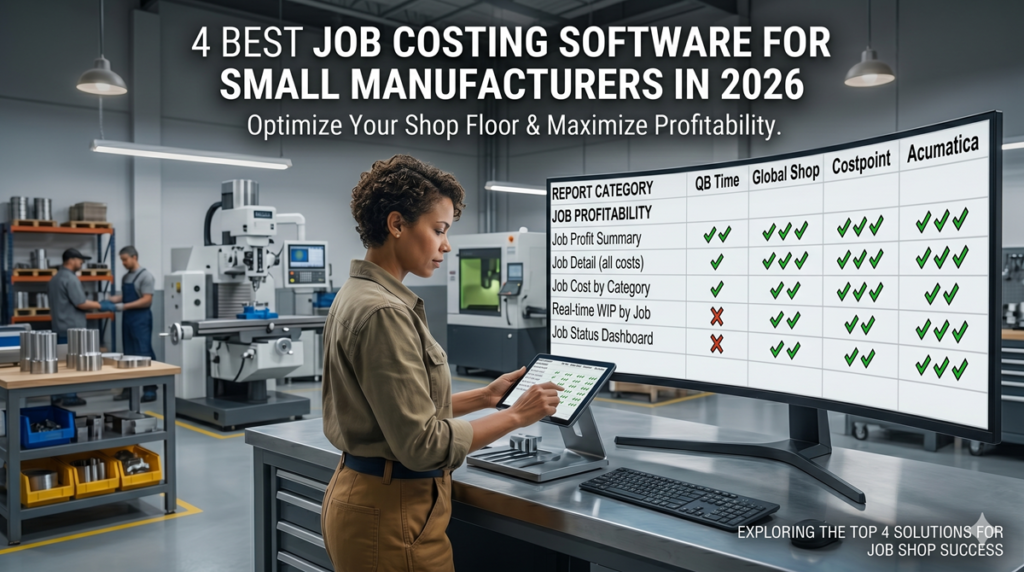
- ✔️ Job profitability summary
- ✔️ Actual vs estimated (variance)
- ✔️ Job cost detail (materials, labor, overhead)
- ✔️ Work-in-process (WIP) report
- ✔️ Completed jobs analysis
- ✔️ Customer profitability
- ✔️ Trend analysis
- ✔️ Custom report builder
7. Integration Requirements
- ✔️ Accounting system sync (QuickBooks, Xero, NetSuite)
- ✔️ Payroll integration
- ✔️ Inventory management
- ✔️ CRM integration
- ✔️ Project management tools
- ✔️ Mobile apps (iOS/Android)
Nice-to-Have Features:
Advanced Capabilities:
- Change order management
- Resource scheduling
- Capacity planning
- Material requirements planning (MRP)
- Purchase order management
- Vendor management
- Document management
- Customer portal (job status visibility)
- Barcode/RFID for material tracking
- API for custom integrations
Reporting & Analytics:
- Real-time dashboards
- KPI tracking
- Profitability alerts
- Predictive analytics (job will go over budget)
- What-if scenarios
- Custom fields and reports
Section 1.2: Standalone vs Integrated
Standalone Job Costing Software:
Pros
- ✔️ Best-of-breed (specialized features)
- ✔️ Often easier to use
- ✔️ Less expensive upfront
- ✔️ Faster implementation
- ✔️ Can keep current accounting system
Cons
- ❌ Integration challenges
- ❌Data sync issues
- ❌ Duplicate entry possible
- ❌ Multiple systems to manage
- ❌ Potential version conflicts
Best for:
- Already have accounting system you like
- Need specialized job costing features
- Limited budget
- Simple integration needs
Examples: Busybusy, ClockShark, Toggl Track (with add-ons)
Integrated (ERP/Accounting Suite):
Pros:
- ✔️ Seamless data flow
- ✔️ Single source of truth
- ✔️ No integration headaches
- ✔️ Unified reporting
- ✔️ One vendor, one support
Cons:
- ❌ More expensive
- ❌ Longer implementation
- ❌ More complex
- ❌ Vendor lock-in
- ❌ May compromise on job costing depth
Best for:
- Starting fresh or willing to switch
- Need full business system
- Complex operations
- Growth plans
Examples: JobBOSS, Fishbowl, NetSuite, Acumatica
Section 1.3: By Company Size
Micro Job Shops (<$1M, 1-5 employees)
Needs:
- Simple, affordable
- Easy time tracking
- Basic job profitability
- QuickBooks integration
Budget: $50-200/month
Best Options:
- Busybusy
- ClockShark + QuickBooks
- Toggl Track
- Harvest
Small Job Shops ($1-5M, 5-25 employees)
Needs:
- Simple, affordable
- Easy time tracking
- Basic job profitability
- QuickBooks integration
Budget: $50-200/month
Best Options:
- JobBOSS
- E2 Shop System
- Global Shop Solutions
Medium Manufacturers ($5-20M, 25-100 employees)
Needs:
- Full ERP with job costing
- Advanced planning
- Multi-location
- Custom reporting
Budget: $1,000-5,000/month
Best Options:
- JobBOSS (larger implementation)
- Epicor
- IQMS (now DELMIAWorks)
- Acumatica
Large/Complex (>$20M, 100+ employees) (relevance)
Needs:
- Enterprise-grade
- Complex job structures
- Global operations
- Industry-specific
Budget: $5,000-20,000+/month
Best Options:
- NetSuite
- SAP Business One
- Epicor ERP
- Infor CloudSuite
Section 1.4: Budget Considerations
Pricing Models:
Per User/Month (SaaS):
- $20-100/user/month
- Scales with team size
- Predictable, but adds up
Flat Fee:
- $200-2,000/month (company-wide)
- Unlimited users (sometimes)
- Better for larger teams
One-Time License:
- $5,000-50,000 upfront
- Annual maintenance: 15-20% of license
- Better long-term if >5 years
Total Cost of Ownership (5 Years):
Small Job Shop Example:
Software: $400/month × 60 = $24,000
Implementation: $5,000
Training: $2,000
Total 5-year: $31,000
Annual average: $6,200
ROI Calculation:
Current losses from poor costing: $20,000/year
Software prevents: 75% of losses = $15,000/year saved
5-year benefit: $75,000
5-year cost: $31,000
Net benefit: $44,000
ROI: 142%
Plus: Time savings, better decisions, peace of mind
Section 1.5: Key Selection Criteria
Evaluation Framework:
1. Fit for Your Manufacturing Type
- Job shop? Custom? Make-to-order?
- Does software match your workflow?
- Industry-specific features?
2. Ease of Use
- Intuitive interface?
- Mobile-friendly?
- Shop floor workers can use it?
- Training time required?
3. Integration Capability
- Works with current accounting?
- Connects to other tools?
- API availability?
- Data import/export?
4. Reporting Quality
- Reports you need out-of-box?
- Custom report builder?
- Real-time dashboards?
- Export options?
5. Scalability
- Handles current volume?
- Grow with you to 2-3× size?
- Add users/locations easily?
- Performance at scale?
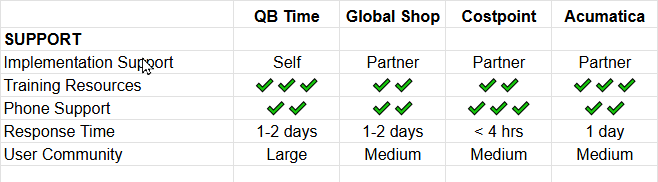
6. Support & Training
- Support hours and channels?
- Response time guarantees?
- Training resources?
- User community?
7. Total Cost
- All-in 3-year cost?
- Hidden fees?
- ROI timeline?
- Contract flexibility?
PART 2: TOP 4 JOB COSTING SOFTWARE
Format per software:
Software #1: QuickBooks Time (formerly TSheets) + QuickBooks
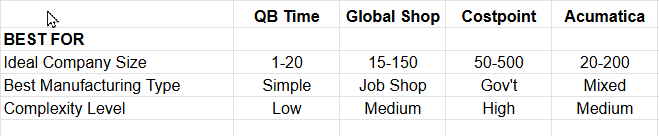
Overview: QuickBooks Time is a time tracking app that integrates with QuickBooks Online or Desktop to provide basic job costing. Best for small manufacturers ($500K-$3M) who need simple time tracking and job profitability without full ERP complexity or cost.
Key Features:
Time Tracking:
- Mobile app (GPS-enabled)
- Clock in/out by job
- Job/project tracking
- Overtime alerts
- Timesheet approvals
- PTO tracking
Job Costing (via QuickBooks):
- Time syncs to jobs in QuickBooks
- Material costs entered in QuickBooks
- Job profitability reports
- Actual vs estimated
- Customer/job reporting
Scheduling:
- Employee schedules
- Shift assignments
- Availability management
- Notifications
Pros:
- ✔️ Very affordable ($8-10/user/month + QuickBooks)
- ✔️ Easy to use (learn in minutes)
- ✔️ Mobile-first (great for field/shop floor)
- ✔️ QuickBooks integration (seamless if already using)
- ✔️ GPS tracking (verify location)
- ✔️ Quick implementation (days, not months)
- ✔️ Scalable pricing (pay per user)
Cons:
- ❌ Basic job costing (relies on QuickBooks)
- ❌ No material requisitions (manual entry in QB)
- ❌ Limited overhead (QuickBooks’ simple allocation)
- ❌ No production scheduling
- ❌ No BOM management
- ❌ QuickBooks limitations (not true manufacturing system)
- ❌ Reports basic (QuickBooks-dependent)
Pricing:
QuickBooks Time:
- $8/user/month (Premium)
- $10/user/month (Elite – scheduling)
- +$20/month base fee
Plus QuickBooks:
- QuickBooks Online Plus: $90/month
- Or Desktop Premier: $549/year
Total (5 employees):
- QB Time: ($8 × 5) + $20 = $60/month
- QuickBooks Online: $90/month
- Total: $150/month or $1,800/year
Implementation: Self-service (free)
Best For:
- ✔️ Very small manufacturers (<$2M)
- ✔️ Current QuickBooks users
- ✔️ Simple job costing needs
- ✔️ Limited budget ($2K/year)
- ✔️ Don’t need advanced features
- ✔️ Mobile workforce
- ✔️ Very small manufacturers (<$2M)
User Reviews:
Positive (G2: 4.5/5, Capterra: 4.7/5):
- “Perfect for our small shop”
- “Easy to use on phones”
- “QuickBooks integration works great”
- “Affordable solution”
Negative:
- “Too simple for complex jobs”
- “Wish it had material tracking”
- “Outgrew it as we scaled”
- “QuickBooks limitations frustrating”
Our Verdict:
Perfect entry-level solution for very small manufacturers who need time tracking and basic job costing without ERP complexity or cost. If you’re using QuickBooks and need to know job profitability, this is the easiest, cheapest option.
Highly recommended for:
- <$2M revenue
- QuickBooks users
- Simple job structures
- Budget under $3K/year
- Want easy implementation
Not recommended for:
- $3M revenue (will outgrow)
- Complex manufacturing
- Need material requisitions
- Want production scheduling
Rating: 9/10 for micro manufacturers Rating: 4/10 for larger/complex operations
Try QuickBooks Time Free | Get QuickBooks Bundle
Software #2: Costpoint (by Deltek)
Overview: Costpoint by Deltek is an enterprise-grade ERP built specifically for government contractors and project-based manufacturers. It goes far beyond standard job costing to deliver deep compliance infrastructure, contract lifecycle management, and audit-ready financials. Best for small to mid-sized manufacturers ($3M–$50M+) who work with government or defense contracts and must meet strict federal regulations like DCAA requirements.
Key Features:
Job Costing & Project Accounting:
- Real-time cost tracking by contract, project, and task
- Actual vs. budget reporting with variance analysis
- Indirect cost pool management and overhead allocation
- Revenue recognition by contract type (FFP, T&M, cost-plus)
- Work-in-progress (WIP) reporting
Government Compliance:
- DCAA audit readiness and timekeeping compliance
- FAR/DFARS regulation support
- Incurred cost submission preparation
- SF1408 pre-award audit support
- Segregated direct and indirect cost tracking
Labor & Time Tracking:
- Employee timesheets with approval workflows
- Labor category and cost type classification
- Leave and absence tracking
- Corrected timesheet audit trails
Contract & Billing Management:
- Contract funding and ceiling tracking
- Government billing formats (SF1034, 1035)
- Invoicing by milestone, T&M, or cost-plus
- Multi-contract and task order management
Financial Management:
- Multi-company and multi-currency support
- Budgeting and forecasting
- General ledger with project subledger
- Cash flow management
Pros
✔️ Industry-leading DCAA compliance (built for government work)
✔️ Handles complex contract structures (T&M, FFP, cost-plus)
✔️ Robust audit trail for every transaction
✔️ Purpose-built for project-based manufacturers
✔️ Strong indirect cost and overhead management
✔️ Scales from small GovCon to large defense prime
Cons:
❌ Overkill (and overpriced) without government contracts
❌ Steep learning curve and lengthy implementation
❌ Higher total cost than most small manufacturer needs
❌ UI feels dated compared to modern cloud ERPs
❌ Heavy reliance on implementation partner
❌ Not ideal for standard commercial manufacturing
Pricing:
Costpoint uses custom pricing based on company size, modules selected, and deployment type (cloud vs. on-premise).
Expect:
- Implementation: $30,000–$150,000+
- Annual licensing: $20,000–$100,000+/year depending on users and modules
- Ongoing support and maintenance fees apply
Contact Deltek directly for a quote. No self-service pricing is published.
Best For:
✔️ Defense and government contractors
✔️ Manufacturers with cost-plus or T&M contracts
✔️ Businesses subject to DCAA audits
✔️ Companies managing multiple contracts simultaneously
✔️ Organizations with complex indirect cost structures
Not Recommended For:
✔️ Purely commercial manufacturers (no government work)
✔️ Businesses under $3M revenue
✔️ Teams without IT/ERP implementation resources
✔️ Anyone needing a quick, low-cost setup
User Reviews:
Positive (G2: 3.9/5, Capterra: 4.1/5):
- “The only system that handles our DCAA requirements out of the box”
- “Indispensable for managing multiple government contracts”
- “Once you’re up and running, the compliance features are unmatched”
Negative:
- “Implementation took far longer than expected”
- “Not intuitive — training is a must”
- “Too expensive if you’re not doing GovCon work”
- “Feels outdated compared to newer cloud systems”
Our Verdict:
Costpoint is the gold standard for manufacturers with government contracts — but it’s a specialist tool, not a general-purpose solution. If DCAA compliance and federal contract management are central to your business, nothing competes at this level. If they’re not, you’re paying for complexity you’ll never use.
Highly recommended for: GovCon manufacturers, defense subcontractors, DCAA-audited businesses
Not recommended for: Commercial-only manufacturers, businesses under $3M, or anyone on a tight budget
Rating: 9/10 for government contractors | 3/10 for commercial manufacturers
Software #3: Global Shop Solutions
Overview: Global Shop Solutions is a comprehensive ERP built from the ground up for discrete manufacturers. Unlike accounting-centric tools bolted onto manufacturing, every module — job costing, shop floor control, scheduling, and inventory — was designed to work together in a single system. Best for small to mid-sized manufacturers ($3M–$50M) who need tight visibility across their entire production process, not just the financials.
Key Features:
Job Costing:
- Real-time job cost tracking from quote to completion
- Work-in-progress (WIP) reporting
- Actual vs. estimated cost comparison
- Labor, material, and overhead cost capture
- Job margin and profitability reporting
Shop Floor Control:
- Shop floor data collection via barcode/touchscreen terminals
- Real-time production status and job tracking
- Labor reporting by operation and work center
- Routing and work order management
- Paperless shop floor (traveler documents)
Production Scheduling:
- Visual scheduling board with drag-and-drop
- Capacity planning by work center
- Priority-based scheduling
- On-time delivery tracking
Inventory & Materials:
- Bill of materials (BOM) management
- Material requirements planning (MRP)
- Purchase order management
- Raw material and finished goods tracking
- Lot and serial number traceability
- Barcode scanning throughout
Estimating & Quoting:
- Integrated estimating with BOM and routing
- Quote-to-job conversion
- Historical cost analysis for accurate quoting
- Customer RFQ management
Quality Management:
- Inspection and non-conformance tracking
- Corrective action management
- Quality holds and disposition
- Certificates of conformance
Pros:
✔️ Purpose-built for discrete manufacturers (not adapted from accounting software)
✔️ Excellent shop floor integration (real-time visibility)
✔️ Strong production scheduling and capacity planning
✔️ Fully integrated BOM and MRP
✔️ Comprehensive feature set in one system
✔️ Scales well as the business grows
✔️ US-based support team with manufacturing expertise
Cons:
❌ Significant upfront implementation cost
❌ Can be complex to set up and configure
❌ May be more than very small shops need
❌ Implementation timeline often 3–6+ months
❌ Requires dedicated internal champion during rollout
❌ Interface, while functional, isn’t as modern-looking as newer cloud ERPs
Pricing:
Global Shop Solutions uses custom pricing. Typical investment ranges:
- Implementation: $50,000–$150,000+ (one-time)
- Annual licensing/support: $15,000–$60,000+/year
- Module-based pricing — costs vary depending on what’s included
Contact Global Shop Solutions for a tailored quote. ROI calculators and reference customers are available on request.
Best For:
✔️ Job shops and custom fabricators
✔️ Discrete manufacturers needing shop floor visibility
✔️ Businesses moving off spreadsheets or entry-level tools
✔️ Companies wanting an all-in-one manufacturing system
✔️ Manufacturers with complex routings and BOMs
Not Recommended For:
✔️ Very small manufacturers (<$2M) — cost likely exceeds benefit
✔️ Process manufacturers (food, chemical, batch)
✔️ Businesses needing government compliance (Costpoint is better)
✔️ Teams without implementation support resources
User Reviews:
Positive (G2: 4.3/5, Capterra: 4.4/5):
- “Finally a system that understands how our shop actually works”
- “Real-time job costing changed how we manage profitability”
- “Shop floor terminals made time tracking accurate for the first time”
- “Support team actually knows manufacturing — not just software”
Negative:
- “Implementation took longer than we hoped”
- “Initial learning curve is steep for shop floor staff”
- “The interface could use a modern refresh”
- “Reporting customization can be frustrating”
Our Verdict:
Global Shop Solutions is one of the strongest purpose-built options for small to mid-sized discrete manufacturers. If your biggest pain point is connecting job costing to what’s actually happening on the shop floor, this system delivers that integration better than most. The investment is significant, but for the right manufacturer, the ROI — in cost visibility, scheduling accuracy, and reduced waste — is substantial.
Highly recommended for: Job shops, custom fabricators, any manufacturer that needs shop floor and costing tightly linked
Not recommended for: Very small shops, process manufacturers, or businesses without implementation budget
Rating: 9/10 for job shops and discrete manufacturers | 5/10 for very small or simple operations
Software #4: Acumatica
Overview: Acumatica is a modern cloud-based ERP platform with a dedicated Manufacturing Edition that delivers enterprise-grade job costing, production management, and financial control. What sets it apart is its consumption-based pricing model — you pay based on usage rather than per user, making it particularly attractive for growing manufacturers who want to give everyone system access without ballooning licensing costs. Best for small to mid-sized manufacturers ($3M–$100M) planning to scale.
Key Features:
Job Costing & Project Accounting:
- Real-time job and project cost tracking
- Actual vs. budgeted cost reporting
- Labor, material, overhead, and subcontract cost capture
- Work-in-progress (WIP) accounting
- Profitability analysis by job, customer, and product line
Manufacturing Management:
- Bill of materials (BOM) and routing management
- Production order management
- Material requirements planning (MRP)
- Manufacturing resource planning (MRP II)
- Shop floor control with data collection
- Engineering change order (ECO) tracking
Inventory Management:
- Multi-warehouse inventory tracking
- Lot and serial number traceability
- Replenishment and reorder point management
- Landed cost tracking
- Barcode scanning support
Financial Management:
- Full general ledger with multi-entity support
- Accounts payable and receivable
- Multi-currency and intercompany transactions
- Fixed asset management
- Bank reconciliation and cash flow forecasting
Reporting & Analytics:
- Customizable dashboards by role
- Built-in business intelligence tools
- Generic inquiry builder (no SQL required)
- Real-time KPI tracking
- Integration with Power BI and other BI tools
Mobile & Integration:
- Full mobile access (iOS and Android)
- Offline capability with sync on reconnect
- Open API for third-party integrations
- Native integrations with Salesforce, HubSpot, and others
- Regular automatic updates included in subscription
Pros:
✔️ No per-user fees (consumption pricing — everyone can have access)
✔️ True cloud architecture (access from anywhere)
✔️ Highly customizable without custom coding
✔️ Strong financial management alongside manufacturing
✔️ Regular updates included at no extra cost
✔️ Excellent mobile access and offline capability
✔️ Large partner and developer network
✔️ Scales from small manufacturer to mid-market enterprise
Cons:
❌ Can be expensive for very small operations
❌ Requires an implementation partner (not self-service)
❌ Consumption pricing can be unpredictable to budget for
❌ Initial complexity can feel overwhelming
❌ Implementation timeline typically 3–6 months
❌ Customizations require partner expertise to maintain
Pricing:
Acumatica uses a consumption-based model rather than per-user fees. Pricing is based on transaction volume and resources used:
- Starting around $1,000–$2,000/month for small businesses
- Mid-market implementations: $3,000–$8,000+/month
- Implementation costs: $20,000–$100,000+ (partner-dependent)
- Annual subscription includes updates and support
Contact an Acumatica partner for a tailored quote — pricing varies significantly based on modules and usage.
Best For:
✔️ Growing manufacturers who want to scale without per-user cost penalties
✔️ Businesses needing strong financials and manufacturing in one system
✔️ Teams who want mobile-first, cloud-native access
✔️ Companies planning significant growth or acquisition
✔️ Manufacturers needing flexible integration with other tools
Not Recommended For:
✔️ Very small manufacturers (<$2M) — cost likely exceeds ROI
✔️ Businesses wanting a simple, quick implementation
✔️ Teams without an implementation partner or IT resources
✔️ Anyone needing government/DCAA compliance (Costpoint is better)
User Reviews:
Positive (G2: 4.5/5, Capterra: 4.3/5):
- “We can give every employee access without worrying about per-seat costs”
- “The manufacturing and financial modules work seamlessly together”
- “Best cloud ERP we evaluated for our growth stage”
- “Mobile access means our supervisors have real-time data on the floor”
Negative:
- “Implementation was more complex than expected — choose your partner carefully”
- “Consumption pricing is hard to predict month to month”
- “Steep learning curve initially”
- “Some advanced customizations required partner help”
Our Verdict:
Acumatica is one of the most compelling options for growth-stage manufacturers who want enterprise capability without enterprise per-user pricing. Its combination of strong manufacturing features, modern cloud architecture, and unlimited user access makes it a smart long-term investment for businesses planning to scale. The key is choosing an experienced implementation partner — the software is capable, but getting maximum value from it requires expertise.
Highly recommended for: Growing manufacturers, multi-site operations, businesses wanting unlimited user access
Not recommended for: Very small shops, simple operations, or anyone needing a fast or self-service setup
Rating: 8/10 for growth-stage manufacturers | 4/10 for very small or simple operations
PART 3: FEATURE COMPARISON TABLES
Section 3.1: Master Comparison Table
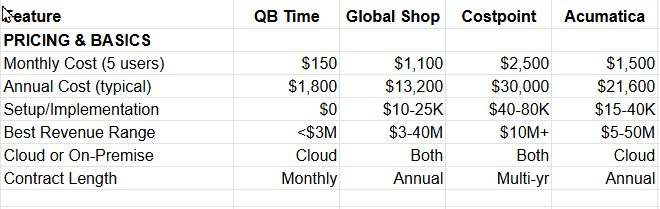
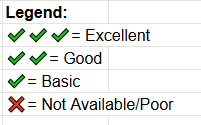
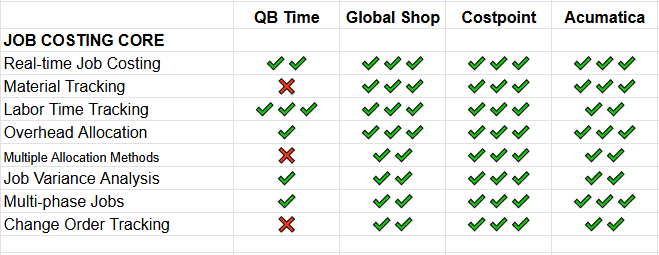
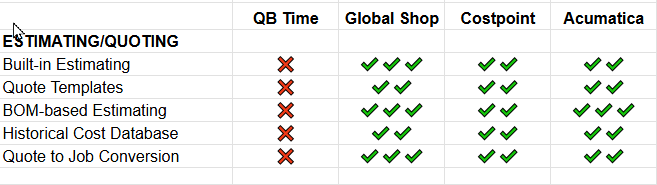
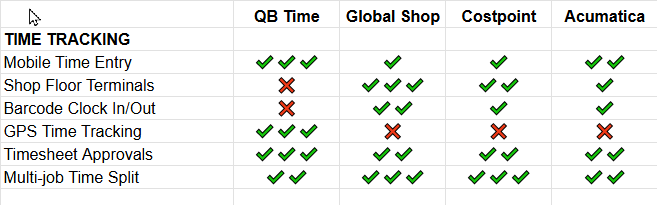
Time Tracking Comparison
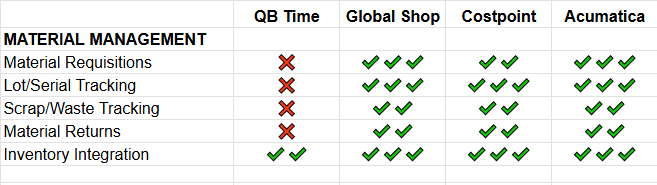
Material Tracking Capabilities
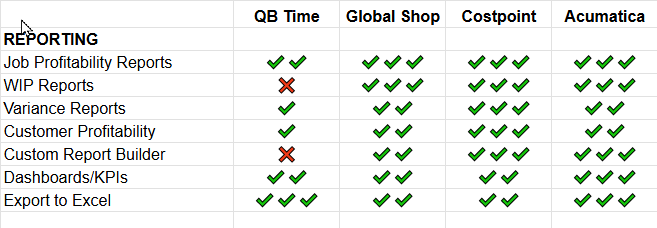
Reporting Quality
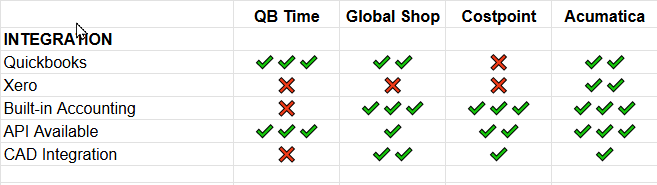
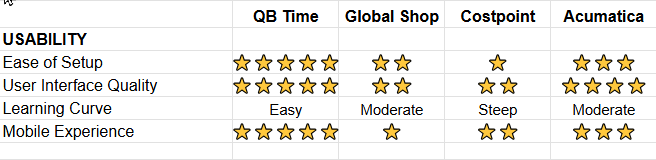
Ease of Use Rankings
Section 3.2: Time Tracking Comparison
Detailed Time Tracking Features:
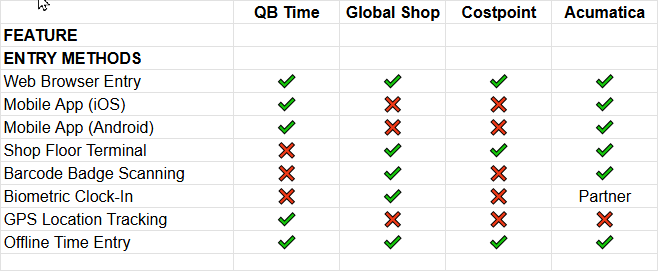
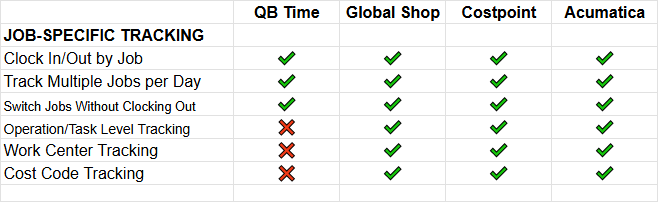
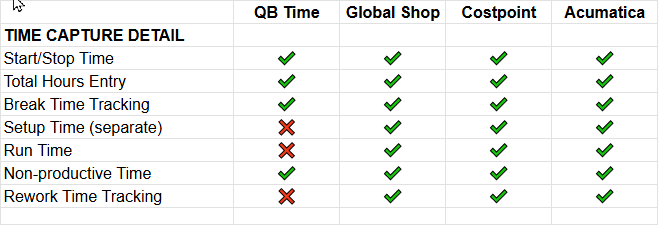
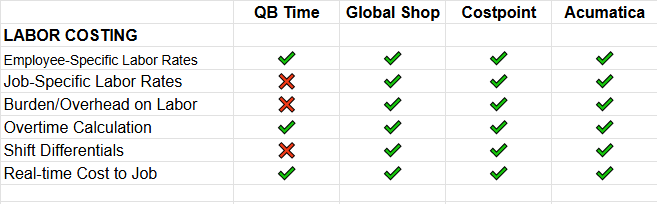
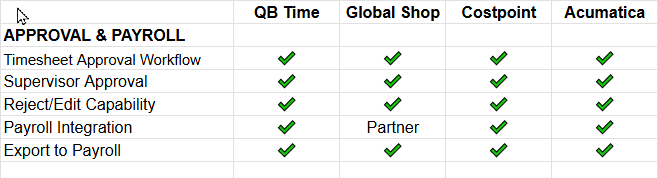
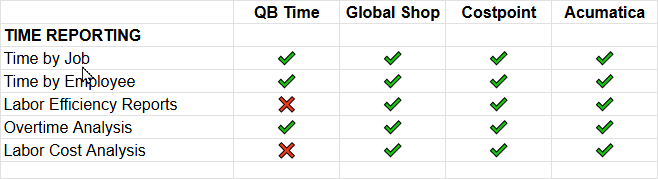
Winner by Category:
- Easiest Time Entry: QuickBooks Time (mobile-first, GPS, simple)
- Most Detailed Shop Floor: Global Shop
- Best for Field Work: QuickBooks Time
- Best Manufacturing Integration: Global Shop
- Best All-Around: Global Shop
Section 3.3: Material Tracking Capabilities
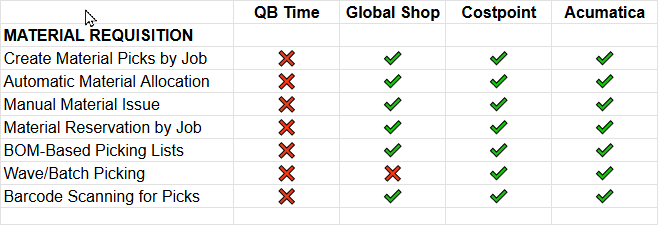
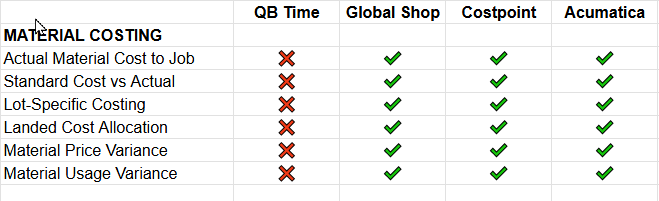
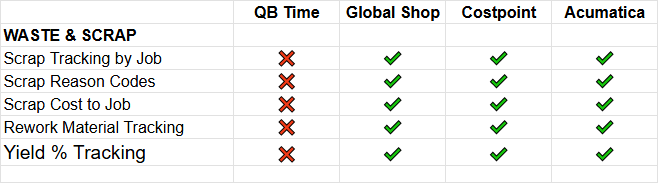
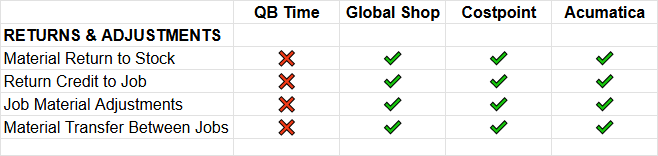
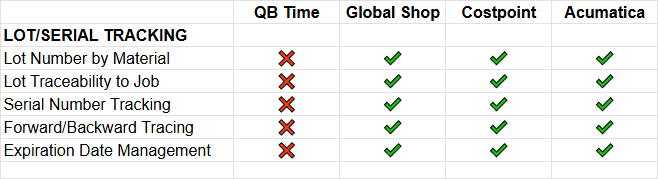
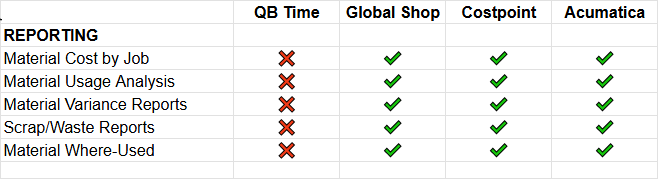
Winner: Global Shop (excellent for manufacturing material tracking)
Not Suitable: QuickBooks Time (no material tracking – time only)
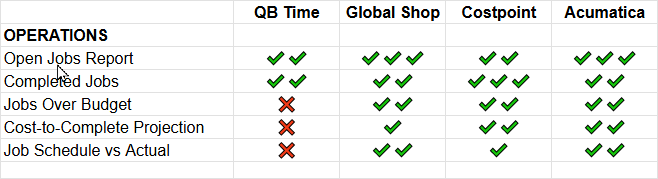
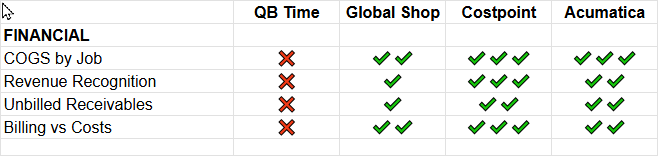
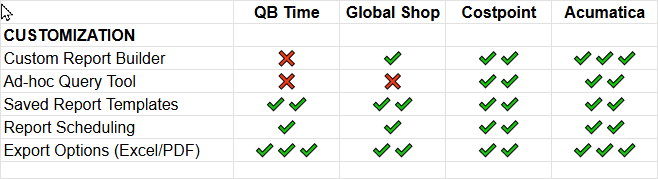
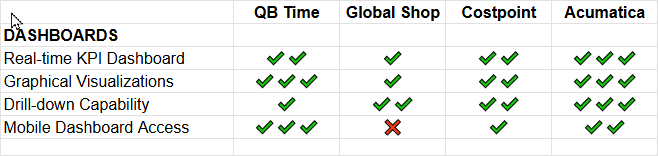
Section 3.4: Reporting Quality
Job Costing Report Quality & Availability:
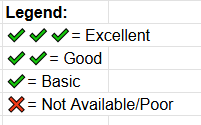
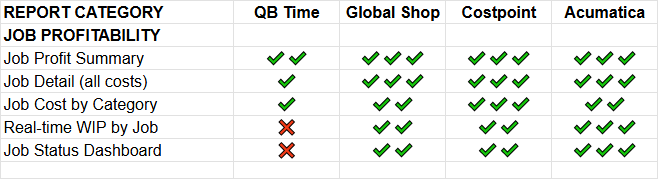
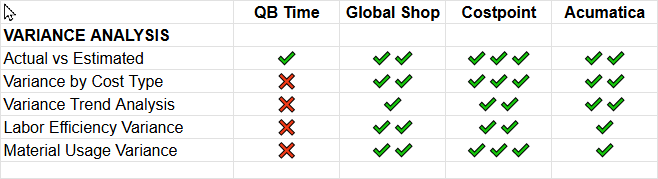
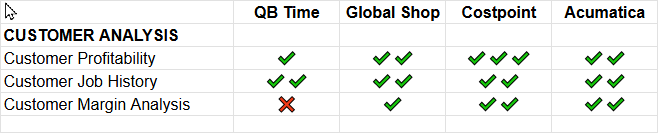
Reporting Winners:
- Best Overall Reporting: Costpoint
- Best Dashboards: Acumatica
- Best Job Cost Detail: Costpoint
- Best Custom Reports: Acumatica, Costpoint
- Easiest to Use: QuickBooks Time
Section 3.5: Ease of Use Rankings
Detailed Usability Scoring (1-10 scale):
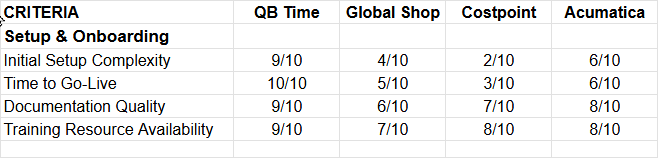
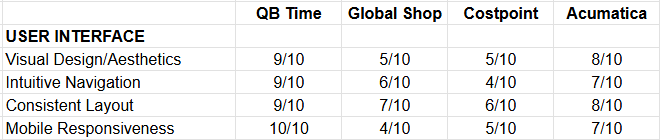
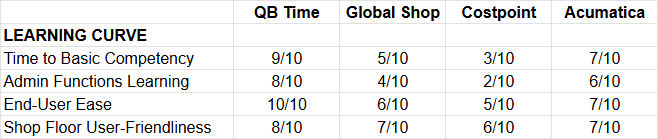
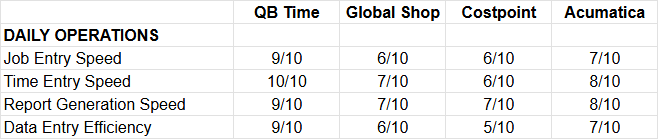
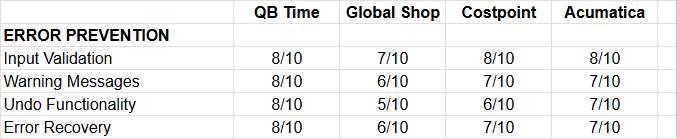

Rankings:
- QuickBooks Time (8.9/10) – Easiest by far, but limited features
- Acumatica (7.2/10) – Modern cloud UI, reasonable learning curve
- Global Shop (5.9/10) – Functional but not user-friendly
- Costpoint (5.5/10) – Most complex, steepest learning curve
Key Insights:
- Easiest doesn’t mean best – QB Time is easiest but lacks features
- Trade-off: Sophistication vs Simplicity
- Modern UI matters – Cloud-native systems Acumatica easier
- Desktop = Dated – Windows-based systems (Global) feels old
- Shop floor workers prefer: Simple time clocks, barcode scanners
Office staff need: Balance of power + usability