Best Manufacturing Accounting Software with Financial Reporting
“Choosing the wrong accounting software costs manufacturers $50,000-$200,000+ in lost time, errors, workarounds, and eventual re-implementation. Here’s how to get it right the first time.” The Manufacturing Software Problem: Real Scenario: Manufacturer started with QuickBooks Desktop Grew from $2M to $8M over 5 years Problems emerged: – Can’t track WIP inventory properly – Job costing…
“Choosing the wrong accounting software costs manufacturers $50,000-$200,000+ in lost time, errors, workarounds, and eventual re-implementation. Here’s how to get it right the first time.”
The Manufacturing Software Problem:
Real Scenario:
Manufacturer started with QuickBooks Desktop
Grew from $2M to $8M over 5 years
Problems emerged:
– Can’t track WIP inventory properly
– Job costing requires manual spreadsheets
– Multi-location nightmare
– No manufacturing-specific reports
– Production planning external
– Integration headaches
Cost of wrong choice:
– Staff time on workarounds: $40,000/year
– Data errors and rework: $25,000/year
– Lost efficiency: $60,000/year
– Finally switched systems: $80,000 implementation
Total 5-year cost: $705,000
If chosen right system initially: $200,000 over 5 years
Difference: $505,000 wasted
Why Manufacturing Accounting Software Is Different:
QuickBooks Works Great For:
- Service businesses
- Consultants
- Simple retail
- No inventory complexity
Manufacturing Needs:
- Three inventory types (RM, WIP, FG)
- Job costing or process costing
- Bill of materials (BOM)
- Production scheduling
- Shop floor tracking
- Overhead allocation
- FIFO/LIFO/Average costing
- UNICAP compliance
- Work order management
- Capacity planning
Generic accounting software = endless workarounds
What This Guide Covers:
1: How to Choose
- Required features for manufacturing
- Company size considerations
- Growth planning
- Budget framework
2: Top Software Options
- Detailed reviews of 10 best options
- Pros, cons, pricing, best for
3: Feature Comparisons
- Side-by-side comparison tables
- Inventory management
- Job costing capabilities
- Reporting and analytics
- Integration options
4: Implementation
- Typical timelines
- Cost considerations
- Data migration
- Training requirements
5: Making Your Decision
- Decision matrix
- Questions to ask vendors
- Demo checklist
- Contract negotiation
Quick Navigation:
Its Company Size:
The Industry:
- Best for Job Shops
- Best for Make-to-Stock
- Best for Custom Manufacturing
- Best for Assembly Operations
By Budget:
PART 1: HOW TO CHOOSE MANUFACTURING ACCOUNTING SOFTWARE
Section 1.1: Essential Features for Manufacturers
Must-Have Features:
1. Multi-Level Inventory Management
- Raw Materials tracking
- Work-in-Process (WIP) valuation
- Finished Goods management
- Multiple locations/warehouses
- Lot/serial number tracking
- Barcode scanning support
- Barcode scanning support
- Inventory valuation methods (FIFO, LIFO, Average)
2. Job Costing or Process Costing
- Track costs by job/project
- Material requisitions
- Labor time tracking
- Overhead allocation
- WIP tracking by job
- Job profitability analysis
- Variance reporting
3. Bill of Materials (BOM)
- Multi-level BOMs
- Component tracking
- Assembly management
- BOM costing
- Engineering change management
- Where-used reporting
4. Production/Work Order Management
- Create work orders
- Schedule production
- Track completion
- Material allocation
- Shop floor data collection
- Production reporting
5. Manufacturing-Specific Reporting
- Cost of Goods Manufactured
- WIP reports
- Inventory valuation
- Job profitability
- Production efficiency
- Scrap/waste reporting
- Capacity analysis
Nice-to-Have Features:
Advanced Planning:
- MRP (Material Requirements Planning)
- Production scheduling
- Capacity planning
- Demand forecasting
Shop Floor:
- Tablet/mobile data entry
- Real-time production tracking
- Quality control tracking
- Equipment integration
Supply Chain:
- Purchase order management
- Vendor management
- EDI integration
- Drop shipping
Quality:
- Quality control checkpoints
- Inspection tracking
- Non-conformance reporting
- Certificate of compliance
Section 1.2: Software by Company Size
Micro Manufacturing (<$1M Revenue, <10 Employees)
Needs:
- Simple, affordable
- Easy to learn
- Basic inventory
- Basic job costing
- Room to grow
Best Options:
- QuickBooks Online + Manufacturing add-on
- Xero + Inventory app
- ERPAG
- inFlow Inventory
Budget: $50-200/month
Small Manufacturing ($1-5M Revenue, 10-30 Employees)
Needs:
- True manufacturing features
- Job costing
- Multi-location
- Production planning
- Better reporting
Best Options:
- Fishbowl Manufacturing
- DEAR Systems
- Katana MRP
- JobBOSS
Budget: $200-800/month
Medium Manufacturing ($5-20M Revenue, 30-100 Employees)
Needs:
- Full ERP capabilities
- Advanced planning
- Multi-location
- Shop floor integration
- Custom reporting
Best Options:
- NetSuite Manufacturing
- Acumatica Manufacturing
- SAP Business One
- Epicor Prophet 21
Budget: $1,000-5,000/month
Large Manufacturing (>$20M Revenue, 100+ Employees)
Needs:
- Enterprise-grade
- Multiple facilities
- Global operations
- Advanced analytics
- Industry-specific
Best Options:
- NetSuite (Advanced Manufacturing)
- SAP S/4HANA
- Microsoft Dynamics 365
- Infor CloudSuite Industrial
- Epicor ERP
Budget: $5,000-50,000+/month
Section 1.3: Budget Framework
Total Cost of Ownership (5 Years):
Software Costs:
- License/subscription fees
- Per-user costs
- Add-on modules
- Annual maintenance (if on-premise)
Implementation:
- Setup and configuration
- Data migration
- Customization
- Integration development
- Training
- Consulting
Ongoing:
- Monthly/annual fees
- Additional users as you grow
- Support contracts
- Updates and upgrades
- Hosting (if cloud)
Example Cost Breakdown:
Small Manufacturer ($3M Revenue)
Year 1:
Software: $5,000
Implementation: $15,000
Training: $3,000
Total Year 1: $23,000
Years 2-5 (annual):
Software: $6,000
Support: $1,500
Annual: $7,500/year
5-Year Total: $53,000
Per year average: $10,600
As % of revenue: 0.35%
ROI Calculation:
Benefits:
– Time savings: $20,000/year
– Error reduction: $15,000/year
– Better inventory management: $25,000/year
– Total annual benefit: $60,000
5-year benefit: $300,000
5-year cost: $53,000
Net benefit: $247,000
ROI: 466%
Rule of Thumb: Budget 0.3-0.8% of annual revenue for accounting/ERP software
Section 1.4: Cloud vs On-Premise
Cloud (SaaS)
Pros: ✓ No servers to maintain ✓ Automatic updates ✓ Access anywhere ✓ Lower upfront cost ✓ Scales easily ✓ Vendor handles backups
Cons: ✗ Ongoing subscription costs ✗ Internet dependency ✗ Less customization ✗ Data on vendor servers
Best for: Most small-medium manufacturers
On-Premise
Pros: ✓ One-time license (cheaper long-term if >10 years) ✓ Full control ✓ More customization ✓ Data stays in-house
Cons: ✗ High upfront cost ✗ Server/IT requirements ✗ Manual updates ✗ Backup responsibility ✗ Less flexibleBest for: Large manufacturers with IT staff, data security concerns
Hybrid: Some vendors offer both—cloud primary with on-premise option
Trend: 80%+ of new implementations are cloud
Section 1.5: Integration Requirements
What to Integrate:
E-commerce:
- Shopify, WooCommerce, Magento
- Sync orders, inventory
- Auto-fulfillment
CRM:
- Salesforce, HubSpot
- Customer data sync
- Sales pipeline to production
Shipping:
- ShipStation, Stamps.com
- Automatic label creation
- Tracking sync
Payment Processing:
- Stripe, PayPal
- Auto-reconciliation
- Reduce manual entry
Manufacturing Execution:
- MES systems
- Shop floor data collection
- Real-time production updates
EDI:
- Large customer requirements
- Purchase orders in
- Invoices/ASNs out
Banking:
- Bank feeds
- Automatic reconciliation
- Cash flow visibility
Integration Methods:
Native: Built into software (best)
Third-Party: Zapier, Integromat (good for simple)
API: Custom development (expensive, flexible)
Manual: Export/import (avoid if possible)
Questions to Ask:
- What integrations are native?
- API availability and documentation?
- Integration costs?
- Who handles setup?
- Support for integrations?
PART 2: TOP 10 MANUFACTURING ACCOUNTING SOFTWARE
Software #1: NetSuite Manufacturing Edition
Overview: NetSuite is the leading cloud ERP for mid-sized to large manufacturers, offering comprehensive financial management, inventory, production planning, and supply chain in a unified platform. Owned by Oracle, it’s highly scalable and feature-rich, suitable for $5M-$500M+ manufacturers.
Key Features:
Manufacturing:
- Advanced work order management
- Multi-level BOM
- Routing and scheduling
- Shop floor control
- Quality management
- MRP/MPS planning
- Make vs buy analysis
Inventory:
- Multi-location warehousing
- Lot and serial tracking
- Demand planning
- Inventory optimization
- Cycle counting
- ABC analysis
Financial:
- Multi-currency
- Multi-subsidiary
- Advanced financial reporting
- Revenue recognition
- Job costing
- Project accounting
Integration:
- Pre-built connectors (Shopify, Salesforce, etc.)
- SuiteCloud platform for custom integrations
- Extensive API
- Third-party ecosystem
Reporting:
- Customizable dashboards
- Real-time analytics
- Custom reports
- KPI tracking
- Role-based access
Pros:
- ✔️ All-in-one solution (ERP, CRM, ecommerce, PSA)
- ✔️ Highly scalable (grows from $5M to $500M+)
- ✔️ Cloud-based (access anywhere, automatic updates)
- ✔️ Strong financials (proper multi-entity, currency)
- ✔️ Extensive ecosystem (apps, integrations, partners)
- ✔️ Regular updates (2x per year, new features constantly)
- ✔️ Global capabilities (multi-country, multi-currency)
- ✔️ Customizable (SuiteScript, workflows, custom fields)
Cons:
- ❌ Expensive ($10K-$50K+ setup, $1K-10K/month ongoing)
- ❌ Complex implementation (3-6 months typical, needs partner)
- ❌ Steep learning curve (powerful but not intuitive)
- ❌ Customization costs (modifications expensive)
- ❌ Overkill for small (<$5M revenue probably too much)
- ❌ Per-user pricing (costs add up with team growth)
- ❌ Vendor lock-in (hard to switch once implemented)
Pricing:
License:
- Base: $999-2,499/month (company-wide, not per user for base)
- Additional users: $99-$199/month each
- Manufacturing module: Additional $
- Advanced modules: Extra fees
Implementation:
- Partner fees: $25,000-$150,000+
- Timeline: 3-6 months
- Depends on complexity, customization
Total First Year (Typical Mid-Size):
- Software: $30,000-$60,000
- Implementation: $50,000-$100,000
- Training: $10,000-$20,000
- Total: $90,000-$180,000
Ongoing Annual:
- Software: $30,000-$70,000
- Support: Included
- Upgrades: Included
Best For:
- ✔️ $5M-$500M+ manufacturers
- ✔️ Multi-location operations
- ✔️ Global or multi-currency needs
- ✔️ Complex manufacturing (make-to-order, configure-to-order)
- ✔️ Need full ERP (not just accounting)
- ✔️ Scaling rapidly
- ✔️ Can invest in proper implementation
User Reviews Summary:
Positive (G2: 4.0/5, Capterra: 4.1/5):
- “Comprehensive solution that grows with us”
- “Eliminated need for 5+ separate systems”
- “Real-time visibility into everything”
- “Excellent for multi-entity operations”
Negative:
- “Implementation was longer and more expensive than quoted”
- “Steep learning curve for non-technical users”
- “Customizations costly”
- “Support can be slow”
Common Theme: Powerful and comprehensive, but requires significant investment in time, money, and training. Worth it for companies that truly need the capabilities.
Our Verdict:
NetSuite is the gold standard for mid-to-large manufacturers who need a true cloud ERP. It’s expensive and complex, but if you’re doing $10M+ and growing, or have multi-location/multi-currency needs, it’s likely worth the investment.
Not recommended for:
- <$5M revenue (too expensive, too complex)
- Simple operations (overkill)
- Tight budgets (ROI takes time)
Highly recommended for:
- $10M+ with growth plans
- Multi-location manufacturers
- Complex operations needing advanced planning
- Companies consolidating multiple systems
Rating: 9/10 for right-sized companies Rating: 5/10 if too small
Get NetSuite Demo | Compare NetSuite Pricing
Software #2: Fishbowl Manufacturing
Overview: Fishbowl is the #1 manufacturing and warehouse management solution for QuickBooks users. It adds manufacturing, advanced inventory, and warehousing capabilities while maintaining QuickBooks for financials. Perfect for small-to-mid-size manufacturers ($1-20M) wanting manufacturing features without full ERP complexity.
Key Features:
Manufacturing:
- Bill of materials (multi-level)
- Work orders
- Production scheduling
- Shop floor control (tablet app)
- Job costing
- Manufacturing orders
- Assembly/disassembly
Inventory:
- Multi-location tracking
- Lot and serial numbers
- Barcode scanning (mobile app)
- Cycle counting
- Inventory valuation (FIFO, LIFO, Average, Standard)
- Min/max levels
- Reorder management
Integration:
- QuickBooks Desktop (deep integration – syncs financials)
- QuickBooks Online (API integration)
- Shopify, WooCommerce, Amazon
- ShipStation, Stamps.com
- Salesforce
Warehouse:
- Pick, pack, ship workflows
- Multiple warehouses
- Bin tracking
- Inventory transfers
- Receiving
Pros:
- ✔️ Best QuickBooks integration (designed specifically for it)
- ✔️ Affordable ($4,395 one-time + $395/month for 5 users)
- ✔️ Purpose-built for manufacturing (not generic ERP)
- ✔️ User-friendly (easier learning curve than NetSuite)
- ✔️ Strong inventory features (advanced for the price)
- ✔️ Mobile apps (iOS/Android for shop floor, warehouse)
- ✔️ One-time license option (not just subscription)
- ✔️ Large user community (lots of resources, partners)
Cons:
- ❌ Requires QuickBooks (dependency, additional cost)
- ❌ Windows only (desktop version, though web version available)
- ❌ Limited financials (relies on QuickBooks)
- ❌ Sync issues (QuickBooks integration not perfect)
- ❌ Basic MRP (demand planning limited)
- ❌ Customization difficult (less flexible than NetSuite)
- ❌ Scalability limits (struggles beyond $20-30M revenue)
Pricing:
Two Options:
Option 1: Perpetual License
- Software: $4,395 (one-time)
- Annual support: $4,725/year (required)
- Includes: 5 users, all modules
- Add users: $750 each (one-time) + $105/year support
Option 2: Subscription
- Monthly: $329-$429/month (5 users)
- Annual: $3,948-$5,148/year
- Includes updates and support
Additional Costs:
- QuickBooks: $50-80/month
- Implementation: $5,000-$25,000 (optional partner)
- Training: $1,500-$5,000
Total Year 1 (Typical):
- Fishbowl: $4,395 (license) + $4,725 (support) = $9,120
- QuickBooks: $960
- Implementation: $10,000
- Total: ~$20,000
Ongoing Annual:
- Support: $4,725
- QuickBooks: $960
- Total: ~$5,700/year
Best For:
- ✔️ $1-20M manufacturers
- ✔️ Current QuickBooks users (Desktop or Online)
- ✔️ Job shops and make-to-order
- ✔️ Need better inventory than QuickBooks offers
- ✔️ Multi-location warehousing
- ✔️ Budget-conscious (vs NetSuite)
- ✔️ Don’t need full ERP
User Reviews Summary:
Positive (G2: 4.0/5, Capterra: 4.1/5):
- “Huge upgrade from QuickBooks alone”
- “Inventory management finally works”
- “Barcode scanning saves hours daily”
- “Affordable for small manufacturers”
- “Good support and training”
Negative:
- “QuickBooks sync can be buggy”
- “Reporting could be better”
- “Windows-only limitation annoying”
- “Learning curve steeper than expected”
- “Some features feel dated”
Common Theme: Excellent solution for QuickBooks-based manufacturers who need true manufacturing capabilities without ERP complexity and cost. Best value in the small-medium segment.
Our Verdict:
Fishbowl is the best choice for small-to-mid-size manufacturers already using or willing to use QuickBooks. It’s affordable, purpose-built for manufacturing, and strikes the right balance of features vs. complexity for the $1-20M segment.
Highly recommended for:
- QuickBooks users needing manufacturing features
- $1-15M manufacturers
- Multi-location inventory needs
- Budget under $25K first year
Not recommended for:
- $20M revenue (outgrow it)
- Need advanced financials (QuickBooks limitations)
- Mac-only shops (Windows required for desktop)
- Hate QuickBooks (required dependency)
Rating: 8.5/10 for QuickBooks-based small manufacturers Rating: 6/10 if you don’t like QuickBooks dependency
Start Fishbowl Free Trial | Get Fishbowl Demo
Software #3: Katana MRP
Overview: Katana is a modern, cloud-based manufacturing ERP designed specifically for small manufacturers and makers. It emphasizes visual production planning, real-time inventory management, and e-commerce integration. Perfect for $500K-$10M manufacturers, especially those selling online (Shopify, WooCommerce).
Key Features:
Production Planning:
- Visual production schedule (drag-and-drop)
- Real-time capacity planning
- Priority-based scheduling
- Auto-scheduling
- Production calendar
Inventory:
- Real-time inventory tracking
- Multi-location/warehouse
- Batch and serial tracking
- Low stock alerts
- Inventory optimization
Manufacturing:
- Bill of materials
- Production orders
- Material requirements
- Shop floor app (tablet-friendly)
- Assembly/kit management
E-commerce Integration:
- Shopify (native, real-time sync)
- WooCommerce (native)
- Amazon, eBay (via integrations)
- Automatic inventory sync
- Order fulfillment
Accounting Integration:
- QuickBooks Online
- Xero
- Auto-sync sales, purchases, inventory
Pros
- Modern, intuitive interface (best UI in category)
- Visual planning (see production schedule at a glance)
- E-commerce focused (perfect for online sellers)
- Easy to learn (up and running in days, not months)
- Affordable ($149-$899/month)
- Cloud-based (access anywhere, auto-updates)
- Good mobile experience (shop floor app works well)
- No implementation needed (truly self-service)
Cons
- Limited for complex (not for intricate BOMs, routings)
- Basic financials (relies on QBO/Xero integration)
- Newer product (less mature than Fishbowl, NetSuite)
- Scalability questions (unproven beyond $10M)
- No on-premise option (cloud-only)
- Limited customization (what you see is what you get)
- Reporting basic (not as robust as competitors)
Pricing:
Plans:
Essential: $179/month
- 1 user
- Unlimited products
- Basic features
- Shopify/WooCommerce integration
- QuickBooks Online/Xero
Advanced: $399/month
- 3 users
- Advanced inventory
- Multi-location
- Priority support
Professional: $899/month
- 10 users
- All features
- Dedicated support
- Advanced integrations
Additional Users: $99/month each
No Setup Fee 14-Day Free Trial
Total Year 1 (Typical Small Manufacturer):
- Software: $4,788 (Advanced plan)
- Setup: $0 (self-service)
- Training: $0 (included)
- Total: ~$5,000
Ongoing: $399/month = $4,788/year
Best For:
✓ $500K-$10M manufacturers ✓ E-commerce/online sellers (Shopify especially) ✓ Make-to-stock operations ✓ Simple to moderate BOM complexity ✓ Want modern, visual interface ✓ Need fast implementation (days/weeks) ✓ Limited IT resources
User Reviews Summary:
Positive (G2: 4.4/5, Capterra: 4.7/5):
- “Finally, manufacturing software that doesn’t look like it’s from 1995”
- “Shopify integration is seamless”
- “Up and running in 3 days!”
- “Customer support is excellent”
- “Intuitive – team learned it quickly”
Negative:
- “Too simple for our complex manufacturing”
- “Reporting needs improvement”
- “No offline mode”
- “Wish it had more advanced planning”
- “Outgrew it as we scaled past $8M”
Common Theme: Perfect for small, modern manufacturers who value ease-of-use and speed of implementation over enterprise features. Especially strong for e-commerce manufacturers.
Our Verdict:
Katana is the best choice for small, digitally-native manufacturers who want a modern tool that works immediately. If you sell on Shopify/WooCommerce and need basic-to-moderate manufacturing capabilities, this is likely your best bet.
Highly recommended for:
- E-commerce manufacturers
- $500K-$5M revenue
- Shopify/WooCommerce sellers
- Want to implement in days, not months
- Value modern UX
Not recommended for:
- Complex manufacturing (deep BOMs, routings)
- $10M revenue
- Need advanced financial features
- Require heavy customization
Rating: 9/10 for e-commerce manufacturers <$5M Rating: 6/10 for complex/large manufacturers
Start Katana Free Trial | See Katana Pricing
Software #4: DEAR Systems (Cin7 Core)
Overview: DEAR Systems — now rebranded as Cin7 Core — is a cloud-based inventory and manufacturing management platform that punches well above its price point for mid-market manufacturers. It combines genuine multi-channel inventory management, bill of materials, production orders, and purchasing with deep integrations to QuickBooks Online, Xero, and major e-commerce platforms. Best for $2M–$30M manufacturers who need more than Fishbowl or Katana but aren’t ready for the complexity or cost of NetSuite or Acumatica.
Key Features
Manufacturing:
- Multi-level bill of materials (finished goods, sub-assemblies, components)
- Production orders with actual vs. estimated cost tracking
- Assembly and disassembly orders
- Work-in-process tracking
- Job costing with material, labor, and overhead allocation
- Finished goods production reporting
- Scrap and wastage tracking
Inventory:
- Multi-location warehouse management
- Batch and serial number tracking (with full traceability)
- FIFO, FIFO by expiry, and weighted average costing
- Reorder points and min/max management
- Stocktake (cycle counting)
- Inventory valuation reporting
- Consignment stock tracking
Purchasing and Sales:
- Purchase order management with landed cost allocation
- Supplier management and pricing tiers
- Sales order management
- Backorder management
- Drop-shipping support
- Customer pricing tiers and discounts
Financial Integration:
- QuickBooks Online (native, deep sync)
- Xero (native, deep sync)
- Automatic journal entry generation for all inventory movements
- Multi-currency transactions
- Tax management (GST, VAT, sales tax)
E-Commerce and Multichannel:
- Shopify, WooCommerce, Magento (native)
- Amazon, eBay (via integrations)
- Real-time inventory sync across all channels
- Automatic order import and fulfillment
Pros:
- ✔️ Excellent value (enterprise-grade inventory at mid-market price)
- ✔️ True multi-channel inventory (best in class for omnichannel manufacturers/distributors)
- ✔️ Strong landed cost tracking (allocates freight, duty, and handling to unit cost accurately)
- ✔️ Deep accounting integration (QuickBooks Online and Xero sync is genuinely reliable)
- ✔️ Batch and serial traceability (full chain from supplier PO to customer invoice)
- ✔️ Good manufacturing module (BOMs, production orders, job costing all functional)
- ✔️ Cloud-based with no implementation required (self-service setup possible)
- ✔️ Responsive support (live chat, extensive documentation)
Cons:
- ❌ Manufacturing depth limited (adequate for standard production; insufficient for complex routings, shop floor control, or MRP)
- ❌ Reporting is basic (pre-built reports are functional; custom reporting requires export to Excel or third-party BI tool)
- ❌ Relies on external accounting system (not a standalone financial system — requires QBO or Xero)
- ❌ UI can feel cluttered (layout less polished than Katana)
- ❌ Limited production scheduling (no visual scheduling or capacity planning)
- ❌ Rebranding confusion (DEAR → Cin7 Core has caused some support and documentation inconsistency)
Pricing:
| Plan | Monthly (billed annually) | Users Included |
| Standard | $349/month | 1 |
| Advanced | $599/month | Unlimited |
| Manufacturing add-on | +$200/month | — |
- Additional integrations (Amazon, eBay, etc.): $39–$79/month each
- No setup fee; 14-day free trial available
Total Year 1 (Typical $5M Manufacturer):
- Software (Advanced + Manufacturing): $9,588
- Setup/self-implementation: $0–$5,000
- Training: $0–$2,000
- QuickBooks Online: $1,200
- Total: ~$11,000–$18,000
- Ongoing: ~$9,600–$10,800/year
Best For:
- ✔️ $2M–$30M product-based businesses and manufacturers
- ✔️ Omnichannel sellers (online + wholesale + retail + B2B)
- ✔️ Businesses needing strong landed cost tracking (importers especially)
- ✔️ Batch-tracked products (food, beverage, cosmetics, pharma)
- ✔️ Companies wanting manufacturing features without full ERP commitment
- ✔️ QuickBooks Online or Xero users who need more inventory depth
Not Recommended For:
- Complex make-to-order manufacturers (limited shop floor and routing capabilities)
- Companies needing standalone financials (requires QBO/Xero)
- $30M+ operations requiring MRP, advanced scheduling, or multi-entity consolidation
- Businesses needing heavy production customization
User Reviews (G2: 4.3/5 | Capterra: 4.3/5):
Positive:
- “Best inventory software we’ve found at this price point — competitors want 5× more for similar features”
- “Landed cost allocation finally works the way we need it to; our unit costs are accurate for the first time”
- “Batch traceability is excellent — we can trace any recall back to the raw material lot in under a minute”
- “The Xero integration is seamless; journals post automatically and our accountant loves it”
Negative:
- “Manufacturing module works for basic production but we outgrew it when we added routings and work centers”
- “Reporting is limited — we export to Excel for anything useful”
- “The DEAR to Cin7 rebrand was confusing and support quality dipped during the transition”
Our Verdict:
DEAR/Cin7 Core occupies a genuinely useful middle ground between simple inventory apps and full ERP systems. For product-based businesses and manufacturers who sell across multiple channels, import goods with complex landed costs, or deal in batch-tracked products, it’s one of the best-value platforms available. Its manufacturing module is functional but not deep — if job costing, routings, or shop floor control are central to your business, look at JobBOSS or Acumatica instead.
- Highly recommended for: $2M–$20M multi-channel manufacturers, importers, and batch-tracked product businesses
- Not recommended for: Complex make-to-order manufacturers or companies needing standalone financials
Rating: 8.5/10 for multi-channel product businesses | 6/10 for complex manufacturing
Software #5: Acumatica Manufacturing Edition
Overview: Acumatica Manufacturing Edition is the fastest-growing cloud ERP in the mid-market segment, offering a genuinely comprehensive manufacturing and financial platform at a price point that undercuts NetSuite while outperforming most smaller systems. Its standout feature is unlimited-user pricing — you pay based on transaction volume, not headcount — making it unusually cost-effective for growing manufacturers. Best for $5M–$75M manufacturers who need true ERP capabilities but can’t justify or don’t want to pay for NetSuite or SAP.
Key Features
Manufacturing:
- Production order management (discrete and project manufacturing)
- Multi-level BOM with engineering change management
- Routing and work center management
- MRP (Material Requirements Planning) and MPS (Master Production Scheduling)
- Capacity planning and scheduling
- Shop floor data collection (mobile and tablet-friendly)
- Scrap and rework tracking
- Outside processing / subcontracting
Financial Management:
- Full GL, AP, AR, bank reconciliation
- Multi-entity consolidation (multiple companies/subsidiaries)
- Multi-currency with real-time exchange rates
- Project accounting and job costing
- Fixed asset management
- Deferred revenue recognition
- Intercompany transactions
Inventory and Warehouse:
- Multi-warehouse, multi-bin management
- Lot and serial number tracking (with full traceability)
- Multiple inventory valuation methods (FIFO, average, standard)
- Cycle counting and physical inventory
- Replenishment and demand forecasting
- Landed cost allocation
Reporting and Analytics:
- Configurable dashboards by role
- Generic inquiry (self-service report builder)
- Financial reporting with multi-entity consolidation
- Built-in Power BI connector
- Operational KPI dashboards
- Drill-down from summary to transaction
Integration:
- Open REST API (extensive, well-documented)
- Native connectors: Salesforce, Shopify, HubSpot
- EDI support
- Payroll integrations (ADP, Paychex)
- 3PL and WMS integrations
Pros:
- ✔️ Unlimited-user pricing (site license — enormous advantage as the team grows)
- ✔️ True cloud ERP (not a desktop product with a cloud wrapper)
- ✔️ Modern, intuitive interface (fastest user adoption of any mid-market ERP)
- ✔️ Full financials built in (no need for separate accounting software)
- ✔️ Strong manufacturing depth (MRP, routings, shop floor — genuine ERP manufacturing capabilities)
- ✔️ Flexible deployment (public cloud, private cloud on AWS/Azure, or partner-hosted)
- ✔️ Open API (connects easily to virtually any other system)
- ✔️ Active development (regular releases with meaningful new features)
Cons:
- ❌ Less mature than NetSuite/SAP (fewer years in market; occasional edge-case gaps)
- ❌ Implementation still required (2–4 months; not self-service like Katana)
- ❌ Partner quality varies (implementation outcome heavily dependent on partner selection)
- ❌ Advanced process costing limited (better for discrete than continuous manufacturing)
- ❌ Reporting good but not exceptional out of the box (Power BI needed for deeper analytics)
- ❌ Pricing model can be confusing (transaction-based consumption pricing requires careful modeling)
Pricing:
Acumatica prices by transaction volume (consumption), not per user — a significant differentiator.
| Company Size | Estimated Annual License |
| Small ($5M–$15M) | $20,000–$40,000/year |
| Mid ($15M–$50M) | $40,000–$80,000/year |
| Larger ($50M–$100M) | $80,000–$150,000/year |
Implementation:
- Small: $20,000–$50,000
- Mid: $40,000–$100,000
Total Year 1 ($15M Manufacturer):
- Software: $40,000
- Implementation: $55,000
- Training: $10,000
- Total: ~$105,000
- Ongoing: $40,000–$55,000/year
Best For:
- ✔️ $5M–$75M discrete and batch manufacturers
- ✔️ Growing companies (unlimited users means pricing doesn’t punish growth)
- ✔️ Manufacturers who have outgrown Fishbowl, DEAR, or QuickBooks
- ✔️ Mixed operations (make-to-stock, make-to-order, and project work in the same company)
- ✔️ Companies wanting modern cloud ERP without full NetSuite/SAP commitment
- ✔️ Multi-entity businesses needing consolidated financials
Not Recommended For:
- Continuous process manufacturers (DELMIAWorks or NetSuite better suited)
- Businesses under $5M revenue (over-engineered and over-priced)
- Companies expecting self-service implementation (a proper partner is required)
- Government contractors (Deltek Costpoint is purpose-built for that need)
User Reviews (G2: 4.5/5 | Capterra: 4.3/5):
Positive:
- “The unlimited user licensing was the deciding factor — we’ve added 18 users since go-live at no extra cost”
- “Modern interface meant our team actually adopted it; our old Sage system was always ‘too hard'”
- “Full financials plus manufacturing in one system finally — no more syncing between two platforms”
- “Implementation took 16 weeks and came in on budget; our partner was excellent”
Negative:
- “Process costing isn’t as robust as we needed for our continuous operations”
- “Reporting is good but not great — we set up Power BI for our executive dashboards”
- “Partner quality really varies — vet them carefully before signing”
Our Verdict:
Acumatica is the best overall value in the mid-market manufacturing ERP space. It delivers genuine ERP capabilities — full financials, MRP, shop floor, multi-entity — in a modern cloud platform, at a price that significantly undercuts NetSuite and SAP. The unlimited-user licensing model is a genuine differentiator for manufacturers with large shop floor teams. If you’re in the $5M–$75M range and ready to make an ERP investment, Acumatica belongs at the top of your shortlist.
- Highly recommended for: $5M–$75M discrete and batch manufacturers wanting full-ERP capability at mid-market pricing
- Not recommended for: Continuous process manufacturers, businesses under $5M, or those needing a self-service setup
Rating: 9/10 for growing mid-market manufacturers | 6/10 for continuous process or very small operations
Software #6: SAP Business One (Manufacturing)
Overview: SAP Business One is SAP’s ERP platform for small and mid-sized businesses, offering the power and reliability of the SAP platform without the S/4HANA price tag. It’s been the backbone of thousands of $5M–$100M manufacturers for over two decades, with strong financial management, manufacturing, and supply chain capabilities. Available both cloud and on-premise, and supported by one of the largest partner ecosystems in the mid-market ERP world. Best for $10M–$100M manufacturers who want enterprise-grade reliability and are willing to invest in a properly implemented system.
Key Features
Manufacturing:
- Production orders (discrete and process)
- Multi-level BOM with version management
- Routing and work center management
- MRP with multi-level planning
- Standard costing and variance analysis
- Activity-based costing (ABC) module
- Capacity planning
- Shop floor data entry
Financial Management:
- Full GL, AP, AR with multi-currency support
- Multi-entity and intercompany transactions
- Financial consolidation
- Budget management and variance reporting
- Fixed assets management
- Banking and reconciliation
- Revenue recognition
- Tax engine (multi-jurisdiction)
Inventory:
- Multi-warehouse, multi-bin
- Lot and serial tracking with full traceability
- Multiple valuation methods (standard, moving average, FIFO)
- Cycle counting and physical inventory
- Landed costs
- Price lists and discount management
Reporting:
- Crystal Reports (built-in, highly customizable)
- SAP Business One Analytics (powered by HANA)
- Drag-and-relate (drill-down between related records)
- KPI dashboards
- Pervasive analytics (in-screen analytics without separate BI tool)
- Excel integration
Supply Chain:
- Purchase order management
- Supplier evaluation
- Goods receipt and three-way matching
- Quality control checkpoints
- Blanket orders
Pros:
- ✔️ SAP heritage (proven, stable, trusted by 70,000+ SMBs globally)
- ✔️ Strongest financial reporting in its class (Crystal Reports + HANA analytics)
- ✔️ Flexible deployment (cloud, on-premise, or hybrid — uncommon at this price point)
- ✔️ Best activity-based costing module in the mid-market
- ✔️ Massive partner ecosystem (large network of specialized implementation partners)
- ✔️ Industry-specific versions (manufacturing, food, pharma, wholesale distribution)
- ✔️ Multi-currency and multi-entity (handles global operations well)
- ✔️ Highly customizable (via SAP B1 SDK and partner add-ons)
Cons:
- ❌ Steep learning curve (SAP heritage means complexity; not intuitive for new users)
- ❌ Significant implementation cost ($50,000–$150,000+ typical)
- ❌ Partner-dependent (outcome heavily influenced by implementation partner quality)
- ❌ UI feels dated (particularly the on-premise version; cloud is somewhat better)
- ❌ Per-user licensing adds up (Professional licenses are expensive; Limited licenses have feature restrictions)
- ❌ Customizations can be costly (SDK-based modifications require developer hours)
- ❌ Not ideal for very simple operations (overkill and overpriced for manufacturers under $5M)
Pricing:
| License Type | Cost |
| Professional license (on-premise, one-time) | $3,213/user |
| Limited license (on-premise, one-time) | $1,666/user |
| Annual maintenance (on-premise) | ~19% of license value |
| Cloud subscription | $100–$200/user/month |
Implementation (typical 10-user setup):
- Partner fees: $40,000–$120,000
- Customization: $10,000–$40,000
- Training: $5,000–$15,000
Total Year 1 ($15M Manufacturer, 10 users, cloud):
- Software: $18,000–$24,000
- Implementation: $70,000
- Training: $10,000
- Total: ~$100,000–$105,000
- Ongoing: $18,000–$30,000/year
Best For:
- ✔️ $10M–$100M manufacturers
- ✔️ Companies wanting enterprise SAP reliability without S/4HANA cost
- ✔️ Multi-entity or global operations requiring strong financials
- ✔️ Manufacturers prioritizing activity-based costing and financial reporting depth
- ✔️ Industries with compliance requirements (food, pharma, medical devices)
- ✔️ Companies with an on-premise preference (rare option at this price point)
Not Recommended For:
- Manufacturers under $5M (too expensive and complex)
- Businesses wanting quick, low-cost implementation
- Teams that require a modern, intuitive UI
- Simple, single-location operations
User Reviews (G2: 4.0/5 | Capterra: 4.2/5):
Positive:
- “SAP quality at a fraction of S/4HANA cost — exactly what a $20M manufacturer needs”
- “The financial reporting is excellent; our CFO finally has the consolidation reports she’s been asking for for years”
- “Crystal Reports customization means we can build any report the business needs”
- “Activity-based costing module is genuinely the best we’ve found at this price point”
Negative:
- “The UI looks like 2010 — our younger staff find it frustrating”
- “Implementation ran $30K over the original quote; scope creep and partner issues”
- “Per-user licensing got expensive as we grew; wish they had a site license option”
Our Verdict:
SAP Business One is the right choice for mid-market manufacturers who prioritize financial depth, reporting flexibility, and proven enterprise-grade stability over modern UI and ease of implementation. Its ABC costing module is the strongest in its class, and its financial consolidation capabilities handle multi-entity complexity that stumps cheaper alternatives. The investment is real — budget $80K–$150K for Year 1 — but for a $20M+ manufacturer with serious financial reporting requirements, the ROI is there.
- Highly recommended for: $10M–$100M manufacturers needing enterprise financial depth and ABC costing
- Not recommended for: Manufacturers under $5M, teams sensitive to steep learning curves, or businesses with limited implementation budgets
Rating: 8.5/10 for mid-to-large manufacturers | 5/10 for small or budget-constrained businesses
Software #7: JobBOSS² (Epicor)
Overview: JobBOSS² (now part of the Epicor family) is the leading job shop management and accounting platform for small-to-mid-size custom and make-to-order manufacturers. Unlike general ERPs adapted for manufacturing, JobBOSS was built from the ground up for the job shop environment — where every order is different, estimating accuracy determines profitability, and job-level cost visibility during production (not just at month end) is essential. Best for $2M–$30M job shops, machine shops, fabricators, and custom manufacturers.
Key Features
Job Costing (Core Strength):
- Detailed job cost tracking (materials, labor, outside services, overhead)
- Real-time cost-to-complete visibility during production
- Actual vs. estimated comparison by job, operation, and cost element
- Job profitability reports (per job, per customer, per part)
- Multi-level job structure (parent/child jobs for complex assemblies)
- WIP valuation by job
Estimating and Quoting:
- Integrated estimating module (quote → job conversion with one click)
- Material cost calculation from BOM
- Labor and machine time estimation by operation
- Overhead and markup configuration
- Win/loss tracking
- Historical quote comparison
Shop Floor:
- Shop floor data collection (barcode scanning, touchscreen terminals)
- Real-time job status tracking
- Labor time capture by operation
- Machine time tracking
- Scheduling board (visual, drag-and-drop)
- Outside process management
Inventory:
- Raw material tracking
- Purchase order management
- Material requisitions against jobs
- Receiving and inspection
- Min/max reorder management
- Inventory valuation
Financial:
- General ledger
- Accounts receivable and invoicing
- Accounts payable
- Integration with QuickBooks (for companies preferring external accounting)
- Job-level financial reporting
- Basic financial statements
Pros:
- ✔️ Best job costing in the segment (purpose-built for job shops — no competitor matches the depth)
- ✔️ Quote-to-cash in one system (estimate → job → production → shipping → invoice with no re-entry)
- ✔️ Real-time job cost visibility (see cost-to-complete while the job is still on the floor, not after)
- ✔️ Strong shop floor integration (data collection terminals feed directly into job costs)
- ✔️ Industry standard (10,000+ job shop installations; widely known and understood)
- ✔️ Reasonable price ($15K–$50K Year 1 vs. $100K+ for SAP or Acumatica)
- ✔️ Purpose-built UI (designed around job shop workflows, not adapted from generic ERP)
Cons:
- ❌ Limited to job/make-to-order (not suitable for make-to-stock or continuous process manufacturing)
- ❌ Basic financial reporting (adequate for small shops; insufficient for multi-entity or complex financial needs)
- ❌ Desktop heritage (the Windows-based version feels dated; cloud version improving)
- ❌ Not a full ERP (many shops still need QuickBooks alongside it for financial reporting)
- ❌ Limited MRP (basic material planning; not suitable for complex supply chain management)
- ❌ Scalability ceiling (~$30M; beyond that, manufacturers typically need NetSuite or Epicor ERP)
Pricing:
| Option | Cost |
| Cloud subscription (5 users) | $150–$250/user/month |
| Traditional license (5 users) | $15,000–$30,000 one-time |
| Annual maintenance (traditional) | ~$3,000–$5,000/year |
| Implementation | $10,000–$30,000 |
Total Year 1 (Cloud, 5 Users):
- Software: $12,000–$18,000
- Implementation: $15,000
- Training: $5,000
- Total: ~$32,000–$38,000
- Ongoing: $12,000–$18,000/year
Best For:
- ✔️ $2M–$30M job shops, machine shops, and fabricators
- ✔️ Custom and make-to-order manufacturers where every job is different
- ✔️ Businesses where estimating accuracy directly drives profitability
- ✔️ Shops needing real-time job cost visibility on the floor
- ✔️ Manufacturers wanting industry-specific software without ERP complexity
Not Recommended For:
- Make-to-stock manufacturers
- Continuous process operations
- Multi-entity businesses needing consolidated financials
- Manufacturers above $30M revenue
- Companies needing advanced financial reporting or ABC costing
User Reviews (G2: 3.9/5 | Capterra: 4.0/5):
Positive:
- “Job costing is excellent — we finally know exactly where we make and lose money on every job”
- “The quote-to-job workflow eliminated double entry; we estimate in JobBOSS and the job is created automatically”
- “Real-time job cost visibility on the shop floor changed how our supervisors manage jobs”
- “Paid for itself in better estimating accuracy within the first year”
Negative:
- “Financial reporting is basic — we still keep QuickBooks for our accountant”
- “The Windows desktop version feels dated; the cloud version is better but still catching up”
- “We outgrew it at $28M and had to move to NetSuite — migration was painful”
Our Verdict:
JobBOSS² is the clear choice for job shops and custom manufacturers in the $2M–$30M range. No competing system matches its depth of job costing, estimating-to-production workflow, or real-time shop floor cost visibility at its price point. Its limitations — basic financial reporting, no process costing, scalability ceiling — are well-defined and predictable, so you can plan for them. If your business is a job shop, start here.
- Highly recommended for: $2M–$30M job shops, custom manufacturers, and fabricators
- Not recommended for: Make-to-stock operations, process manufacturers, or companies needing advanced financial consolidation
Rating: 9/10 for job shops | 5/10 for process or make-to-stock manufacturers
Software #8: Epicor Kinetic (formerly Epicor ERP)
Overview: Epicor Kinetic — the cloud evolution of the long-running Epicor ERP platform — is a purpose-built manufacturing ERP for mid-to-large discrete manufacturers. With decades of manufacturing-specific development behind it, Epicor Kinetic delivers deep shop floor integration, sophisticated production planning, multi-mode manufacturing support (make-to-order, make-to-stock, configure-to-order, engineer-to-order), and strong financial management in a single platform. Best for $20M–$500M manufacturers in discrete industries (metal fabrication, industrial equipment, electronics, automotive suppliers) who need a manufacturing-DNA ERP rather than a financial system adapted for manufacturing.
Key Features
Manufacturing:
- Multi-mode production (MTO, MTS, CTO, ETO in the same system)
- Advanced work order management with operation-level tracking
- Multi-level BOM with engineering change management
- Routing and work center scheduling
- MRP and MPS (Master Production Scheduling)
- Finite and infinite capacity planning
- Shop floor data collection (real-time, mobile-enabled)
- Outside processing and subcontracting
- Quality control and inspection
Financial Management:
- Full GL with multi-entity and multi-currency support
- AP and AR with automated workflows
- Project accounting and job costing
- Standard costing and variance analysis (material, labor, overhead)
- Fixed asset management
- Cash flow management
- Multi-GAAP reporting (US GAAP, IFRS)
- Intercompany transactions and eliminations
Supply Chain:
- Procurement and supplier management
- Advanced purchasing (blanket orders, consignment)
- Demand management and forecasting
- Warehouse management (multi-location, multi-bin)
- Lot and serial traceability
- Landed cost management
Reporting and Analytics:
- Epicor Data Analytics (built-in BI)
- Configurable dashboards by role
- Standard manufacturing and financial report library
- Custom report designer
- KPI trackers
- Integration with Power BI and Tableau
Pros:
- ✔️ Manufacturing DNA (built for manufacturers, not adapted from finance software)
- ✔️ Multi-mode manufacturing (handles MTO, MTS, CTO, and ETO in one system — rare capability)
- ✔️ Deepest shop floor integration (real-time data collection, scheduling, and costing from the floor up)
- ✔️ Strong financial management (full GL, multi-entity, multi-GAAP — not just manufacturing)
- ✔️ Proven at scale ($20M–$1B manufacturers in production)
- ✔️ Industry-specific functionality (discrete manufacturing editions for metals, industrial, electronics)
- ✔️ Flexible deployment (cloud, on-premise, or hybrid)
Cons:
- ❌ Expensive ($80K–$300K+ Year 1)
- ❌ Complex implementation (4–8 months; requires experienced partner)
- ❌ Steep learning curve (deep system with many configuration options)
- ❌ Cloud version (Kinetic) still maturing (some customers on on-premise version due to feature parity concerns)
- ❌ Not appropriate under $15M (overbuilt and over-priced for smaller operations)
- ❌ Customizations require developer (not business-user configurable for complex changes)
Pricing:
| Component | Cost |
| Cloud subscription (Kinetic) | $175–$350/user/month |
| On-premise license | $3,000–$5,000/user (one-time) |
| Annual maintenance (on-premise) | ~20% of license |
| Implementation | $75,000–$250,000+ |
| Training | $15,000–$40,000 |
Total Year 1 ($30M Manufacturer, 15 Users, Cloud):
Ongoing: $40,000–$65,000/year
Software: $40,000–$63,000
Implementation: $125,000
Training: $25,000
Total: ~$190,000–$213,000
Best For:
- ✔️ $20M–$500M discrete manufacturers
- ✔️ Mixed-mode operations (MTO + MTS + CTO in the same plant)
- ✔️ Metal fabricators, industrial equipment, electronics, and automotive suppliers
- ✔️ Companies needing real shop floor control (not just ERP with a scheduling screen)
- ✔️ Multi-entity manufacturers needing consolidated financials
- ✔️ Businesses replacing aging on-premise ERP with a modern cloud system
Not Recommended For:
- Manufacturers under $15M revenue
- Continuous process manufacturers (DELMIAWorks is better suited)
- Businesses needing fast, low-cost implementation
- Simple, single-product operations
User Reviews (G2: 3.8/5 | Capterra: 3.9/5):
Positive:
- “Epicor was built for manufacturers — you can feel it in every workflow”
- “Multi-mode manufacturing support is unique; no other system handled our MTO and MTS operations in one place”
- “Shop floor integration is exceptional — real-time job costs changed how our supervisors manage production”
- “Strong financial reporting; our CFO is happy and that matters”
Negative:
- “Implementation was long and expensive — plan for 6 months and budget conservatively”
- “The cloud (Kinetic) version still has some gaps versus on-premise; check feature parity for your specific needs”
- “Steep learning curve; we needed 3 months of training before users were fully productive”
Our Verdict:
Epicor Kinetic is a top-tier choice for mid-to-large discrete manufacturers where manufacturing complexity — not just financial management — is the primary requirement. Its multi-mode manufacturing capability, deep shop floor integration, and strong financials make it one of the most complete manufacturing ERP platforms in the mid-market. The investment is significant, but for a $30M+ manufacturer replacing a patchwork of systems, it’s money well spent.
- Highly recommended for: $20M–$300M discrete manufacturers with complex, multi-mode operations
- Not recommended for: Manufacturers under $15M, continuous process operations, or tight-budget implementations
Rating: 9/10 for complex mid-to-large discrete manufacturers | 5/10 for small or process manufacturers
Software #9: QuickBooks Online Advanced (Manufacturing & Wholesale)
Overview: QuickBooks Online Advanced with inventory and manufacturing features (formerly QuickBooks Manufacturing & Wholesale) is the entry-level option for very small manufacturers who need to step beyond basic bookkeeping without committing to a dedicated manufacturing platform. It handles basic inventory, simple job tracking, and standard financial reporting — all within the familiar QuickBooks environment. Best for under-$2M manufacturers, home-based producers, and startups that need organized accounting with light inventory before outgrowing into a dedicated system.
Key Features
Inventory (Basic):
- Product and inventory item tracking
- FIFO inventory valuation
- Reorder points and low-stock alerts
- Basic purchase order management
- Inventory reports (valuation, quantity on hand)
- Bundles and kits (basic assembly)
- Multi-location inventory (Advanced plan)
Manufacturing (Limited):
- Bill of materials (single-level, via bundles/kits or third-party app)
- Basic work order management (via third-party add-on)
- Simple job costing (via Projects feature)
- Basic landed cost tracking (Advanced plan)
Financial Management (Strong):
- Full general ledger
- Accounts payable and receivable
- Bank feeds and reconciliation
- Payroll (add-on)
- Multi-currency (Plus plan and above)
- Class and location tracking
- Budget management
- 80+ pre-built financial reports
Integrations:
- Extensive app marketplace (750+ apps including manufacturing add-ons)
- Popular manufacturing add-ons: Fishbowl, MRPeasy, Katana, DEAR/Cin7 Core
- E-commerce: Shopify, WooCommerce, Amazon (native)
- Payments: PayPal, Stripe, Square
- Payroll: QuickBooks Payroll, Gusto
Pros:
- ✔️ Lowest total cost (most affordable starting point for manufacturers)
- ✔️ Familiar interface (most small business owners already know QuickBooks)
- ✔️ Excellent financial accounting (genuinely strong bookkeeping and financial reporting)
- ✔️ Huge app ecosystem (if you need more, add it — hundreds of manufacturing add-ons available)
- ✔️ Fast setup (up and running in hours, not months)
- ✔️ Accountant-friendly (your CPA almost certainly knows QuickBooks)
- ✔️ Good e-commerce integrations (Shopify, Amazon, WooCommerce native)
- ✔️ Mobile app (iOS and Android, functional for basic tasks)
Cons:
- ❌ Not a manufacturing system (manufacturing features are workarounds or add-ons, not native)
- ❌ No true job costing (Projects feature is a rough approximation; not suitable for complex job shops)
- ❌ No WIP tracking (work-in-process inventory cannot be properly valued)
- ❌ No production scheduling or MRP
- ❌ No shop floor data collection
- ❌ BOM is single-level at best (multi-level requires a third-party add-on)
- ❌ Inventory management basic (limited for multi-location, lot tracking, or complex assemblies)
- ❌ You will outgrow it (most manufacturers hit the ceiling at $1M–$3M revenue)
Pricing:
| Plan | Monthly (billed annually) |
| Simple Start | $17.50/month |
| Essentials | $32.50/month |
| Plus (most common for manufacturing) | $49.50/month |
| Advanced | $117.50/month |
- Payroll add-on: $45–$125/month + $6/employee
- Manufacturing add-ons (third-party): $50–$400/month additional
Total Year 1 (Typical Small Manufacturer, Plus Plan):
- QuickBooks Plus: $594
- Manufacturing add-on (e.g., MRPeasy): $1,188
- Total: ~$1,800–$3,000
Best For:
- ✔️ Startups and pre-revenue manufacturers setting up their first accounting system
- ✔️ Manufacturers under $1M–$2M revenue with simple operations
- ✔️ Businesses where financial accounting is more important than manufacturing features for now
- ✔️ Companies who want to start with QuickBooks and add manufacturing functionality via add-on apps
- ✔️ Makers and cottage manufacturers (jewelry, food, crafts) who need organized bookkeeping
Not Recommended For:
- Any manufacturer above $2M–$3M with genuine manufacturing complexity
- Job shops needing real job costing
- Manufacturers with multi-level BOMs
- Businesses needing WIP inventory valuation
- Anyone needing production scheduling or MRP
User Reviews (G2: 4.0/5 | Capterra: 4.3/5):
Positive:
- “Perfect for starting out — easy, affordable, and my accountant knows it”
- “The app integrations (we added Katana) gave us the manufacturing features we needed without switching platforms”
- “Financial reporting is excellent; we always know exactly where we stand”
Negative:
- “Manufacturing features are basically non-existent natively — you’re dependent on add-ons”
- “We outgrew it at $2M and the migration to a real manufacturing system was painful — wish we’d planned ahead”
- “No proper WIP tracking; our inventory values were always a guess”
Our Verdict:
QuickBooks Online is the right starting point for very small manufacturers — and a poor long-term solution for anyone past the startup phase. Its financial accounting is genuinely good; its manufacturing capabilities are genuinely inadequate for any real complexity. Use it to start, but build your migration plan to a proper manufacturing system before you hit $2M–$3M revenue. The cost of switching gets higher the longer you wait.
- Highly recommended for: Startups and manufacturers under $2M needing affordable, familiar accounting
- Not recommended for: Any manufacturer with genuine production complexity or above $2M–$3M revenue
Rating: 8/10 as a starting accounting platform | 4/10 as a manufacturing system
Software #10: Microsoft Dynamics 365 Business Central (Manufacturing)
Overview: Microsoft Dynamics 365 Business Central is a cloud ERP that has become a strong option for mid-market manufacturers, particularly those already invested in the Microsoft ecosystem (Office 365, Teams, Excel, Power BI). Its manufacturing capabilities — production orders, BOMs, routing, MRP, standard costing — sit within a full ERP that includes genuine financial management, CRM-lite functionality, and best-in-class analytics via Power BI. Best for $5M–$100M manufacturers who want enterprise-quality financials, Microsoft ecosystem integration, and faster implementation than SAP or Epicor.
Key Features
Manufacturing:
- Production order management (firm planned, released, finished)
- Multi-level BOM with version control and routing
- Work center and machine center management
- MRP (Material Requirements Planning) and MPS
- Capacity planning (finite and infinite)
- Standard costing with variance analysis (material, labor, overhead)
- Assembly orders (lighter-weight production for kitting and assembly)
- Subcontracting management
Financial Management (Core Strength):
- Full general ledger with flexible dimension-based reporting
- Multi-entity and intercompany transactions
- Multi-currency with automatic exchange rate updates
- AP, AR, and bank reconciliation
- Fixed asset management
- Budget management and variance reporting
- IFRS and local GAAP support
- Cash flow forecasting
Reporting and Analytics (Standout Capability):
- Native Power BI integration (best-in-class analytics on top of ERP data)
- Excel-native reporting (real-time data pull into spreadsheets)
- Built-in financial report designer
- Role-based dashboards
- Pre-built manufacturing KPI reports
- Drill-through from dashboard to transaction
Microsoft Ecosystem Integration:
- Outlook (email, calendar, and contacts linked to ERP records)
- Teams (ERP data and workflows within Teams channels)
- Excel (bi-directional data sync)
- SharePoint (document management linked to ERP)
- Power Automate (workflow automation without code)
- Azure (cloud infrastructure; optional AI/ML add-ons)
Pros:
- ✔️ Best analytics in class (Power BI integration is genuinely world-class for ERP reporting)
- ✔️ Microsoft ecosystem fit (if your team lives in Teams and Excel, this is a natural extension)
- ✔️ Strong financial management (proper multi-entity, multi-currency, multi-GAAP)
- ✔️ Faster and cheaper to implement than SAP or Epicor ($40,000–$100,000 vs. $100,000–$250,000+)
- ✔️ Modern, familiar interface (Office-style UI reduces training time dramatically)
- ✔️ Large partner network (thousands of certified implementation partners globally)
- ✔️ Extensible via ISV add-ons (large marketplace of manufacturing-specific extensions)
- ✔️ Strong roadmap (Microsoft invests heavily in Business Central development)
Cons:
- ❌ Manufacturing depth limited compared to Epicor/NetSuite (adequate for standard discrete manufacturing; insufficient for complex routings, advanced scheduling, or heavy shop floor control)
- ❌ Process costing weak (designed primarily for discrete manufacturing)
- ❌ Customizations via extensions can create upgrade risk (extensions sometimes break on major updates)
- ❌ Job costing is adequate but not best-in-class (JobBOSS or Epicor better for make-to-order)
- ❌ Microsoft-first bias (some things are better because of the ecosystem; others are awkward outside it)
- ❌ Per-user licensing (unlike Acumatica’s site license; costs grow with headcount)
Pricing:
| License | Monthly Cost |
| Business Central Essentials | $70/user/month |
| Business Central Premium (includes manufacturing) | $100/user/month |
- ISV manufacturing add-ons: $5,000–$30,000/year (if needed)
- Implementation: $25,000–$100,000
- Training: $5,000–$20,000
Total Year 1 (10 Users, Premium):
- Software: $12,000
- Implementation: $50,000
- Training: $12,000
- Total: ~$74,000
- Ongoing: $12,000–$20,000/year
Best For:
- ✔️ $5M–$100M discrete and batch manufacturers
- ✔️ Microsoft 365 shops wanting ERP inside the same ecosystem
- ✔️ Companies prioritizing financial reporting depth and Power BI analytics
- ✔️ Batch manufacturers, assembly operations, and make-to-stock producers
- ✔️ Multi-entity businesses needing consolidated financials
- ✔️ Businesses wanting a faster, less-disruptive implementation than SAP or Epicor
Not Recommended For:
- Make-to-order job shops (JobBOSS better)
- Continuous process manufacturers
- Companies outside the Microsoft ecosystem who don’t want to be in it
- Manufacturers needing deep shop floor control
User Reviews (G2: 4.0/5 | Capterra: 4.0/5):
Positive:
- “The Power BI integration is the best I’ve seen in any ERP — our management team finally has dashboards they actually use”
- “The interface feels like Office, so our team adopted it quickly — no ‘this is too complicated’ complaints”
- “Implementation was 14 weeks and on budget — much smoother than our previous SAP project”
- “Multi-entity consolidation just works; our controller used to spend 3 days on this every month”
Negative:
- “Manufacturing depth is okay for our standard production, but we needed an ISV add-on for advanced scheduling”
- “Per-user licensing is expensive as the shop floor team grew — wish there was a site license option”
- “Process costing is too basic for our continuous operations; we should have chosen NetSuite”
Our Verdict:
Microsoft Dynamics 365 Business Central is the best manufacturing ERP for companies that are already — or want to be — deep in the Microsoft ecosystem. Its financial management is genuinely strong, its analytics via Power BI are best-in-class, and its implementation timeline and cost are more manageable than SAP or Epicor. Where it falls short is manufacturing depth: advanced shop floor control, heavy job costing, and process costing all require either accepting limitations or adding ISV extensions. If your manufacturing is standard-to-moderate complexity and you love Excel and Teams, this is a compelling choice.
- Highly recommended for: $5M–$100M discrete and batch manufacturers in the Microsoft ecosystem
- Not recommended for: Job shops needing deep job costing, process manufacturers, or non-Microsoft shops
Rating: 8.5/10 for Microsoft-ecosystem manufacturers | 6/10 for complex job shops or process operations
PART 3: FEATURE COMPARISON TABLES
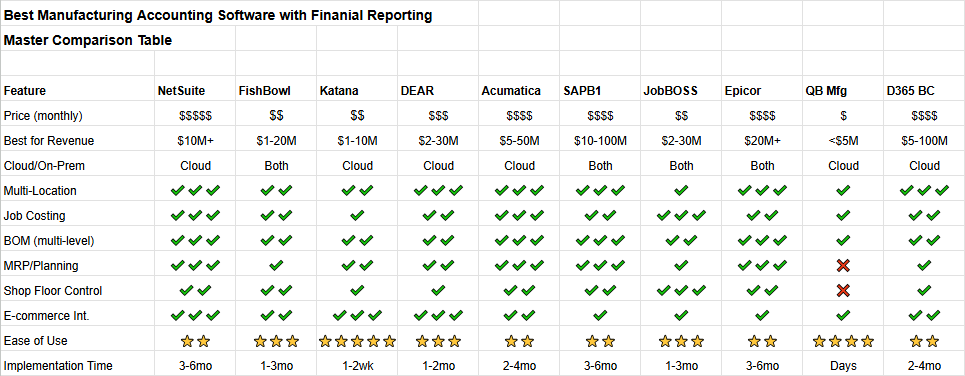
Section 3.2: Inventory Management Comparison
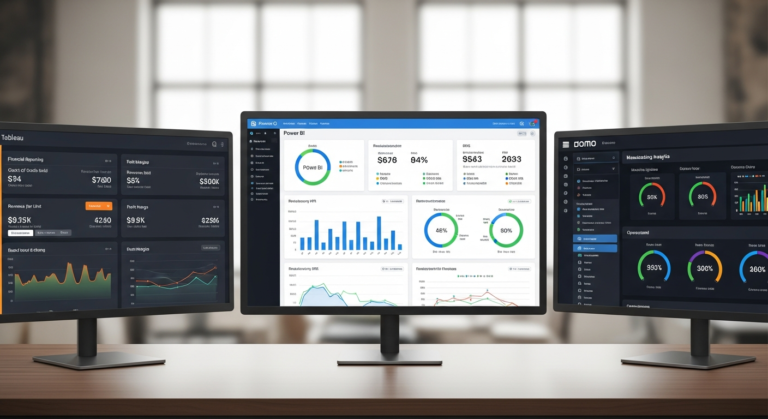
Inventory management is where manufacturing accounting software separates itself from general-purpose accounting tools. The gap between basic and advanced inventory can determine whether your product costs are accurate and whether your balance sheet reflects reality. Here’s how the platforms compare across the features that matter most for manufacturers:
Three-Type Inventory (Raw Materials, WIP, Finished Goods)
This is the fundamental requirement for manufacturing accounting. NetSuite, Acumatica, SAP Business One, Epicor, and Dynamics 365 all handle three-type inventory natively as part of their manufacturing module — raw material receipts, WIP accumulation through production, and finished goods movement are all tracked with proper accounting entries. Fishbowl handles this well in its manufacturing context. DEAR/Cin7 Core handles finished goods and raw materials well, with basic WIP. Katana tracks raw materials and finished goods but WIP is more limited. JobBOSS tracks WIP at the job level. QuickBooks alone has no meaningful WIP tracking — this is one of its critical manufacturing limitations.
Valuation Methods
FIFO, LIFO, weighted average, and standard costing produce materially different inventory values and cost of goods sold figures. All enterprise systems (NetSuite, SAP, Epicor, Acumatica, Dynamics) support all major valuation methods. Fishbowl supports FIFO, LIFO, average, and standard costing. DEAR/Cin7 Core supports FIFO and weighted average. Katana uses weighted average. QuickBooks Online uses FIFO only. If LIFO or standard costing are regulatory or analytical requirements for your business, this immediately narrows your choices.
Lot and Serial Number Tracking
For manufacturers in regulated industries (food, pharma, medical devices, aerospace) or anyone dealing with product recalls, warranty management, or component traceability, lot and serial tracking is non-negotiable. NetSuite, SAP, Epicor, Acumatica, and Dynamics 365 all provide full lot and serial traceability — from supplier PO through production to customer shipment. DEAR/Cin7 Core has strong lot and serial tracking (a genuine differentiator at its price point). Fishbowl supports lot and serial tracking. Katana supports batch and serial tracking at the basic level. JobBOSS handles serial tracking for job-level components. QuickBooks has no meaningful lot tracking.
Multi-Location and Multi-Warehouse
For manufacturers with multiple plants, warehouses, or distribution points, multi-location inventory management is essential. NetSuite, SAP, Epicor, Acumatica, and Dynamics 365 all handle complex multi-location structures including inter-location transfers, location-level costing, and consolidated reporting across sites. Fishbowl handles multiple warehouses well — one of its strengths. DEAR/Cin7 Core offers good multi-location support. Katana supports multiple locations from its Advanced plan upward. JobBOSS is primarily single-location. QuickBooks Online Advanced supports basic multi-location.
Cycle Counting and Physical Inventory
Maintaining accurate inventory in a live manufacturing environment requires ongoing cycle counting programs, not just annual physical inventory. Enterprise systems (NetSuite, SAP, Epicor, Acumatica, Dynamics) all support ABC-based cycle counting programs with configurable count frequencies. Fishbowl and DEAR/Cin7 Core offer functional cycle counting. Katana provides basic cycle count capability. QuickBooks and JobBOSS have limited or manual cycle counting.
Section 3.3: Job Costing Capabilities
Job costing is the capability that most distinguishes manufacturing accounting from general business accounting — and the feature where the gap between platforms is most pronounced. Here’s what to look for and how each system measures up:
Real-Time vs. Period-End Job Costs
The most valuable form of job costing is real-time — knowing the current cost of a job while it’s still on the production floor, so supervisors can intervene before an over-budget job becomes a loss. JobBOSS is the clear leader here, with real-time job cost visibility designed as its core feature. NetSuite and Epicor provide real-time job costing in their manufacturing modules. Acumatica calculates job costs on production order close rather than continuously. SAP, Dynamics, and Fishbowl typically provide job costing at order close or period end. Katana and DEAR/Cin7 Core calculate job costs at production order completion.
Actual vs. Estimated Variance
Comparing what a job actually cost to what was estimated (or what the standard cost predicted) is where job costing becomes a management tool rather than just a reporting function. JobBOSS, NetSuite, and Epicor all provide detailed actual-vs.-estimated variance reporting at the job level, broken down by cost element (materials, labor, outside services, overhead). Acumatica provides good variance reporting at order close. SAP Business One’s variance analysis is strong for standard costing scenarios. Dynamics 365 has adequate variance analysis. Fishbowl’s variance reporting is functional but less detailed. Katana provides basic estimated vs. actual comparison.
Multi-Level Job Costing
Complex assemblies often require job-within-job structures — a parent job that consumes outputs from child jobs, each with their own cost accumulation. NetSuite, Epicor, and SAP handle multi-level job structures natively. JobBOSS supports parent/child job structures for complex assemblies. Acumatica handles multi-level production orders. Dynamics 365 supports multi-level production via its BOM structure. Fishbowl, DEAR, and Katana have limited multi-level job costing capability.
Customer and Product Profitability
Beyond individual job costing, manufacturers need to roll up job-level profitability to answer the questions that drive strategy: which customers are profitable, which product lines are worth expanding, and which should be repriced or discontinued. NetSuite, Epicor, SAP, Acumatica, and Dynamics all provide multi-dimensional profitability analysis (by customer, product, job, department, and period). JobBOSS provides strong customer and part profitability reporting. Fishbowl provides basic profitability reporting. Katana and DEAR/Cin7 Core have limited roll-up profitability analysis.
Overhead Allocation
Accurate job costing depends on correctly allocating overhead — and this is where most simple systems fail. NetSuite, SAP, Epicor, Acumatica, and Dynamics all support multiple overhead cost pools with configurable allocation bases (labor hours, machine hours, units, etc.). JobBOSS supports departmental overhead rates allocated to jobs by machine or labor hours. Fishbowl supports basic overhead allocation. Katana and QuickBooks have limited overhead allocation functionality — a significant costing accuracy gap.
Section 3.4: Reporting and Analytics
Manufacturing businesses need two distinct types of reporting: financial reporting (income statement, balance sheet, cash flow — primarily for external stakeholders and compliance) and operational/management reporting (job profitability, inventory valuation, production efficiency, variance analysis — for internal decision-making). The best platforms do both well. Here’s how they compare:
Financial Reporting Depth
SAP Business One leads the mid-market on financial reporting depth — its Crystal Reports integration allows highly customized financial statements, and its multi-entity consolidation is particularly strong. Dynamics 365 Business Central delivers the best combination of financial reporting and analytics, especially with Power BI layered on top. NetSuite’s financial reporting is comprehensive, with real-time multi-subsidiary consolidation. Epicor and Acumatica both offer solid financial reporting. Fishbowl relies on QuickBooks for financial reporting — strong if you like QuickBooks; limited if you don’t. Katana and DEAR/Cin7 Core both offload financial reporting to QuickBooks or Xero; their own financial reports are minimal. JobBOSS has basic financial statements adequate for small shops. QuickBooks remains the easiest entry-level financial reporting tool.
Manufacturing and Operational Reports (Out-of-the-Box)
Epicor and NetSuite have the deepest pre-built manufacturing report libraries — years of manufacturing-specific development are visible in the breadth and relevance of their standard reports (production efficiency, scrap analysis, WIP aging, job variance summary, capacity utilization). JobBOSS has an excellent set of pre-built job shop reports. SAP Business One’s standard manufacturing reports are comprehensive. Acumatica and Dynamics 365 have adequate pre-built manufacturing reports with good drill-down. Fishbowl has decent inventory and basic manufacturing reports. Katana’s reports cover the essentials for small manufacturers. DEAR/Cin7 Core has solid inventory and purchasing reports but limited manufacturing-specific reports.
Self-Service Report Building
The ability for finance or operations users to build their own reports — without IT involvement or consulting hours — is increasingly important. Dynamics 365 with Power BI is the standout: business users can build sophisticated visual analytics against live ERP data with no coding. Acumatica’s generic inquiry tool allows significant self-service report building. NetSuite’s saved searches and SuiteAnalytics give power users strong self-service capability. SAP Business One’s drag-and-relate and pervasive analytics are good but have a steeper learning curve. JobBOSS and Fishbowl have limited self-service reporting. Katana, DEAR/Cin7 Core, and QuickBooks typically require Excel export for custom analysis.
Dashboard and KPI Visibility
Real-time operational dashboards — production efficiency today, WIP by job, inventory below reorder point, outstanding purchase orders — are how management accounting translates into daily operational decisions. NetSuite and Acumatica both have configurable, role-based dashboards that are genuinely useful out of the box. Dynamics 365 + Power BI delivers the most visually compelling dashboards. Epicor’s dashboards are functional but less modern. SAP’s dashboards work well, particularly with the HANA analytics layer. JobBOSS has practical operational dashboards for job shop management. Fishbowl and DEAR/Cin7 Core have basic dashboards. Katana’s visual production board is an operational dashboard, not an analytics tool. QuickBooks has basic dashboards adequate for financial overview.
Section 3.5: Integration Ecosystem
No manufacturing accounting system operates in isolation. The strength of a platform’s integration ecosystem — how well it connects to e-commerce storefronts, CRM systems, payroll providers, shipping platforms, shop floor equipment, and EDI networks — significantly affects total system effectiveness. Here’s how the platforms compare:
E-Commerce Integration
For manufacturers who sell direct (DTC or B2B online), native e-commerce integration is critical for keeping inventory levels accurate across production and sales channels. Katana leads on e-commerce focus — its Shopify and WooCommerce integrations are native, real-time, and highly rated by users. DEAR/Cin7 Core is the strongest for multi-channel commerce, supporting Shopify, WooCommerce, Amazon, eBay, and B2B portals. NetSuite offers broad e-commerce connectivity and its SuiteCommerce product for manufacturers selling direct. Fishbowl has good Shopify, WooCommerce, and Amazon integrations. Dynamics 365 has solid e-commerce connections via its connector marketplace. SAP, Epicor, Acumatica, and JobBOSS have e-commerce integrations but they’re typically less seamless than the cloud-native platforms.
CRM Integration
Connecting customer relationship management to manufacturing operations — so that sales opportunities flow into production planning and customer order history informs capacity decisions — requires reliable CRM integration. NetSuite has the most complete native CRM (built into the platform). Salesforce connects natively with NetSuite, Dynamics 365, and Acumatica. Dynamics 365 integrates naturally with Dynamics 365 Sales (same vendor). SAP has its own CRM module and Salesforce integration. Epicor integrates with Salesforce and HubSpot. JobBOSS, Fishbowl, Katana, and DEAR/Cin7 Core have more limited CRM integration options.
Accounting System Integration
For platforms that aren’t full ERPs with native accounting (Fishbowl, Katana, DEAR/Cin7 Core, JobBOSS), the quality of integration with QuickBooks and Xero is critical. Fishbowl’s QuickBooks Desktop integration is purpose-built and the most reliable in the market. DEAR/Cin7 Core’s QuickBooks Online and Xero integrations are well-regarded. Katana’s QuickBooks Online and Xero connections work well for basic financial sync. JobBOSS integrates with QuickBooks but it’s not as seamless as Fishbowl’s connection.
Payroll Integration
Getting labor costs into manufacturing job costing requires reliable payroll data. All enterprise systems (NetSuite, SAP, Epicor, Acumatica, Dynamics) integrate with major payroll providers (ADP, Paychex, Paycom, Ceridian). QuickBooks integrates natively with QuickBooks Payroll and Gusto. Fishbowl relies on QuickBooks for payroll integration.
EDI Capability
Large customers — retailers, automotive OEMs, government buyers — often require EDI for purchase orders, shipping notices, and invoices. NetSuite, SAP, Epicor, Acumatica, and Dynamics 365 all support EDI through native modules or certified third-party partners. Fishbowl has limited EDI support. Katana, DEAR/Cin7 Core, and JobBOSS have minimal native EDI capability — companies with serious EDI requirements should consider this a potential limitation.
PART 4: IMPLEMENTATION GUIDE
Section 4.1: Typical Implementation Timelines
One of the most common mistakes manufacturers make when selecting accounting software is underestimating how long implementation takes — and planning their go-live accordingly. Here’s a realistic view of timelines by platform and company complexity:
Self-Service (Days to Weeks): Katana, QuickBooks Online
The lightest implementations on this list require no outside help and minimal configuration. Katana is designed to be running within days — product catalog loaded, BOMs entered, e-commerce connected. QuickBooks can be operational for basic accounting within hours. The trade-off is functionality: these platforms have real limits, and you will hit them. Budget one to two weeks for a self-service setup, product data entry, and initial training.
Guided Setup (2–6 Weeks): DEAR/Cin7 Core, Fishbowl
Mid-tier platforms typically offer implementation support packages or optional partner services. A typical Fishbowl implementation with a certified partner takes four to eight weeks: data migration from QuickBooks, BOM entry, warehouse setup, initial training. DEAR/Cin7 Core is similar. The risk in this tier is skipping the partner entirely — technically possible, but manufacturers who attempt full self-implementation often struggle with accounting integration and inventory opening balances.
Structured Implementation (2–4 Months): Acumatica, Dynamics 365, JobBOSS
Mid-market ERP implementations require a proper project: discovery (documenting your processes and requirements), configuration (setting up the system to match those processes), data migration (moving customers, suppliers, products, BOMs, and open transactions from the old system), integration development (connecting shop floor, e-commerce, and other systems), user training, and parallel running (running old and new systems simultaneously for at least one accounting period). Two to four months is realistic for a well-scoped project with an experienced partner. Projects run long when scope is poorly defined, data quality is poor, or the implementation partner is under-resourced
Enterprise Implementation (4–8 Months): NetSuite, SAP Business One, Epicor
Enterprise systems require enterprise-grade implementations. Expect four months as a minimum for a straightforward single-site deployment; six to eight months is typical for multi-site, multi-entity, or highly customized implementations. Plan for a parallel run of at least one month. Allocate significant internal resource — a dedicated project manager, functional leads from finance, operations, and IT, and executive sponsorship. The biggest cause of troubled enterprise ERP implementations is not the software — it’s inadequate internal resource allocation.
Timeline Tips That Apply to Every Implementation:
Avoid year-end go-lives — the combination of a new system and annual close is a recipe for chaos. Clean your data before migration — garbage in, garbage out applies permanently. Don’t customize until you’ve lived with the standard product for at least three months. Build in two to four weeks of buffer beyond your planned go-live date. Define done clearly before you start — “go-live” should have specific, measurable criteria.
Section 4.2: Data Migration
Data migration is consistently the most underestimated part of any accounting software implementation. The effort required — and the risk of getting it wrong — scales with the age and complexity of your current system.
What Needs to Migrate
Master data (the foundation):
- Chart of accounts (mapped to new system structure)
- Customer list (with contact details, payment terms, credit limits, tax settings)
- Supplier/vendor list (with banking details, payment terms, lead times)
- Item/product catalog (all products, including finished goods, raw materials, components, and non-inventory items)
- Bill of materials (all active BOMs, ideally reviewed and corrected before migration)
- Routings (if applicable — operation sequences with labor and machine times)
- Employee list (with rates, for job costing)
- Warehouse and bin structure
Opening balances (the numbers):
- General ledger trial balance (as of migration date)
- Accounts receivable aging (open invoices by customer)
- Accounts payable aging (open bills by supplier)
- Inventory on-hand quantities and values (by location, lot, and serial number if applicable)
- Open purchase orders
- Open sales orders
- Open production orders / WIP (the most complex — requires careful valuation)
- Fixed asset register
Data Quality Is the Real Work
In most manufacturing businesses that have been operating for several years, the data in the old system has accumulated errors, inconsistencies, and outdated records. BOMs haven’t been updated to reflect engineering changes. Customer records have duplicate entries. Inventory balances don’t match physical counts. Supplier records have obsolete contacts. The migration process forces a data cleanup — and this cleanup typically takes longer than anyone expects. Budget one to two months for data review, correction, and preparation, particularly if your current system is QuickBooks Desktop or a legacy on-premise system.
Migration Methods
Most implementation partners offer one of three approaches: manual entry (appropriate for small data sets — customers, suppliers, and products under 500 records each), spreadsheet import (the most common approach — data exported from old system, cleaned in Excel, imported via the new system’s bulk upload tool), or automated migration tools (available for common source-to-target paths like QuickBooks to NetSuite or Dynamics; reduces manual effort but still requires data validation).
The Opening Balance Date
Choose your go-live date strategically. Month-end is almost always the best go-live point — it creates a clean break between old and new period financial data. Start of a new fiscal year is ideal if the timeline allows. Mid-month go-lives create complex partial-period splits that create more reconciliation work than they’re worth.
Section 4.3: Training Requirements
Inadequate training is the single most common cause of accounting software implementations that work technically but fail to deliver expected value. Users who don’t understand how to use the system correctly enter data incorrectly, create workarounds that undermine system integrity, and revert to spreadsheets — defeating the purpose of the investment.
Training by Role
Finance and Accounting (Most Critical): The system’s core users — your controller, cost accountant, AR/AP staff — need the deepest training. They need to understand not just how to operate the system, but how the system thinks: how transactions flow through the GL, how inventory movements create journal entries, how WIP is valued, how job costing accumulates, and how period-end close works in the new system. Expect 24–40 hours of formal training per person, plus significant self-directed learning during parallel run.
Production Supervisors and Shop Floor Staff: These users are often overlooked in training planning — but they’re the source of the labor time, material usage, and scrap data that feeds into job costing. They need focused, task-specific training on the exact workflows they’ll use: creating production orders, reporting labor time, recording material issues, logging scrap. Keep training brief and scenario-based. Expect 4–8 hours of targeted training, ideally using their actual jobs and products as examples.
Purchasing and Inventory Staff: Training on purchase order workflows, goods receipt, invoice matching, and inventory management. Expect 8–16 hours.
Management and Executives: Dashboard navigation, KPI interpretation, and report reading. Expect 2–4 hours — focus entirely on the outputs they’ll use, not system mechanics.
Training Formats
Role-based training (different sessions for different user groups) significantly outperforms generic system training. Use your own data — training on the vendor’s demo data leaves users unprepared for their actual workflows. Record sessions for reference and new-hire onboarding. Build a super-user team (two or three staff who receive advanced training) to handle ongoing questions and reduce dependence on the implementation partner post-go-live.
Section 4.4: Change Management
The technical implementation of new accounting software is, in most cases, the easier half of the challenge. The harder half is changing how people work — and that requires deliberate change management.
Why Change Management Gets Skipped
Change management sounds soft relative to data migration and system configuration. It’s also hard to quantify in a project budget. As a result, it’s routinely de-prioritized — and it’s the primary reason implementations that are technically successful still fail to deliver expected ROI. Users who don’t understand why the change is happening, who feel the new system was imposed rather than chosen with them, and who aren’t given the skills and support to work effectively in the new environment will find every reason to avoid using it.
Communicating the Why
Before go-live, leadership should communicate clearly to all affected staff: why the old system was inadequate, what the new system will enable, how it affects each role, and what the timeline looks like. Specificity matters — “this will let us see job profitability in real time instead of guessing at month end” is more motivating than “this is a better system.” Be honest about the learning curve; staff who expect it to be hard on day one are more resilient than those who expect it to be easy.
Involving Users Early
Staff who were involved in the selection and configuration process are dramatically more likely to champion the new system than those who had it handed to them. Identify two to three operational super-users in the selection phase, involve them in demos and configuration decisions, and give them early access during testing. They become internal advocates rather than resistors.
Supporting the Transition Period
Plan for productivity to dip for four to eight weeks after go-live. Budget for temporary extra support resources during this period. Set clear escalation paths for issues. Recognize and reward early adopters who help colleagues. Celebrate milestones — first clean month-end close, first accurate WIP report, first job profitability analysis — to reinforce that the change is working.
PART 5: MAKING YOUR DECISION
Section 5.1: Decision Matrix Tool
Use this structured decision matrix to score your shortlisted vendors and remove subjectivity from the final decision.
Step 1: Establish Your Weighted Criteria
Assign importance weights to the criteria that matter for your business. Below is a suggested set — adjust weights based on your priorities:
| Criteria | Suggested Weight | Your Weight |
| Manufacturing features (BOM, job costing, WIP, MRP) | 25% | ___ |
| Financial reporting quality | 20% | ___ |
| Total 5-year cost | 15% | ___ |
| Ease of use / user adoption | 10% | ___ |
| Integration with existing systems | 10% | ___ |
| Implementation timeline | 8% | ___ |
| Scalability / fits future growth | 7% | ___ |
| Vendor stability and support | 5% | ___ |
| Total | 100% | 100% |
Step 2: Score Each Vendor (1–10)
Score each shortlisted vendor on each criterion. Be honest — a vendor that scores 9 on manufacturing features and 4 on ease of use is showing you a real trade-off that will affect daily operations.
Step 3: Calculate Weighted Scores
Multiply each score by its weight. Sum the weighted scores for each vendor. The highest total weighted score is your analytically preferred choice.
Step 4: Apply Qualitative Judgment
The matrix is a decision support tool, not a decision maker. After calculating scores, ask: Does the top scorer feel right? Are there disqualifying factors for the runner-up? Did the reference checks reveal anything the scoring didn’t capture? Is your implementation partner stronger for one vendor than another?
Quick Decision Guide (Skip the Matrix If Your Situation Is Clear):
- “We’re under $2M and just need accounting with basic inventory”: QuickBooks Online + Katana or DEAR
- “We use QuickBooks and need to add manufacturing features without switching platforms”: Fishbowl
- “We sell on Shopify and make products to stock”: Katana
- “We’re a job shop — custom, make-to-order, under $30M”: JobBOSS²
- “We’re $5M–$75M and want a full cloud ERP with modern UI”: Acumatica
- “We’re in the Microsoft ecosystem and value analytics”: Dynamics 365 Business Central
- “We need the best financial reporting and ABC costing”: SAP Business One
- “We’re $20M+ with complex discrete manufacturing”: Epicor Kinetic or NetSuite
- “We’re $10M+ and want the market leader”: NetSuite
Section 5.2: Questions to Ask Vendors
The demo is your most important evaluation tool — but only if you ask the right questions. Generic questions get scripted answers. Specific, scenario-based questions reveal real capability (and real gaps).
Manufacturing Capability Questions
“Show me how you’d set up a three-level BOM for [describe one of your actual products] and cost it.” (Tests whether multi-level BOM costing is truly native or a workaround.)
“How does the system capture actual labor time on a production job, and how does that feed into job costing?” (Reveals whether shop floor data collection is integrated or manual.)
“What happens if we close a production order and the actual costs differ significantly from estimated? Walk me through the variance — where does it appear, and how do we investigate?” (Tests variance analysis depth.)
“Can you show me the real-time cost status of an open production order?” (Distinguishes real-time from period-end costing.)
Financial Reporting Questions
“Show me a consolidated income statement for two entities, in two currencies.” (Exposes limitations in multi-entity financial consolidation.)
“How would you produce a product profitability report showing gross margin by product line, with overhead fully absorbed?” (Tests whether management reporting is native or requires significant export/manipulation.)
“What does the period-end close process look like? How long does it take, and what can go wrong?” (Experienced users will give honest answers; sales reps will minimize.)
Implementation and Support Questions
“How many of your implementations come in on time and on budget? What are the most common reasons they don’t?” (An honest answer here is a good sign; a defensive answer is a warning.)
“Who will be our day-to-day implementation contact, and can we speak with them before signing?” (You’re buying a relationship with the partner, not just the software.)
“What does support look like after go-live? Give me a specific example of how a customer issue was handled in the last month.” (Vague answers to this question are a yellow flag.)
Reference and Validation Questions
“Can you give me a list of 10 customers in my industry and revenue range so I can choose who to call?” (The ability to provide a list — rather than only offering pre-selected references — indicates confidence in customer satisfaction.)
“What is your average customer tenure?” (High retention rates signal a product and service that delivers ongoing value.)
Section 5.3: Demo Checklist
Before your demo, send the vendor a prep request with these specifications. Vendors who use your actual data and scenario perform far more useful demos than those who use their generic demo environment.
Send in Advance:
- Three to five of your actual products with real BOM structures (multi-level if applicable)
- A sample production scenario (e.g., job order for a custom product, or a production run for a standard product)
- Your current overhead cost pool structure (how you currently allocate overhead to products)
- Two to three specific reports you currently produce that you need the new system to replicate
- Your two or three most important integrations (e.g., “We use Salesforce for CRM and ShipStation for fulfillment — show me how these connect”)
During the Demo, Watch For:
- Does the rep answer your questions directly, or redirect to features they want to show?
- When they demonstrate job costing, is it with real costs or demo data?
- Does the system handle your specific BOM complexity, or does the rep acknowledge it would “require a workaround”?
- How many clicks does it take to complete common tasks? (Complexity adds up over thousands of transactions per year.)
- Do the reports shown answer the specific questions you sent in advance?
- Is the interface one your production supervisors and shop floor staff could realistically use?
Red Flags During a Demo:
- “We’d need to customize that for you” (said for basic features)
- “Most customers handle that with a spreadsheet export”
- The rep avoids your prep materials and shows only pre-scripted scenarios
- Can’t demonstrate the specific costing method you need
- Vague about implementation timeline and cost
Section 5.4: Contract Negotiation Tips
Software contracts — particularly for enterprise ERP systems — are negotiable. Most vendors have significant flexibility on price, implementation terms, and contract structure, particularly at year-end or quarter-end when sales teams are pushing to close.
Pricing Negotiation
License pricing is almost always negotiable for systems above $20,000/year. Start by asking for the fully itemized price list (not just the bundled quote) so you know what each component costs. Common concessions: free additional user licenses, reduced implementation fees, extended free trial period, first-year discount (10–25% is achievable), or inclusion of training hours at no charge. Always ask for a multi-year deal discount if you’re confident in the vendor — a two- or three-year commitment typically yields 10–20% annual savings.
Implementation Scope Protection
Implementation cost overruns are the most common financial surprise in ERP projects. Protect yourself by insisting on a fixed-price or not-to-exceed implementation contract (rather than time and materials), a clearly defined scope-of-work document that specifies exactly what is included, a change order process (any scope change requires written approval with pricing before work begins), and milestone-based payment terms tied to delivery of specific project stages, not calendar dates.
Contract Terms to Negotiate
Data portability — confirm you can export all your data in a usable format if you ever leave. Annual price increase caps — “CPI + 3%” is common; negotiate a hard cap. Termination clauses — understand what it takes to exit, what you pay to do so, and what happens to your data. Support SLA — response time commitments for critical issues should be in writing.
Timing Leverage
Vendors are most flexible at fiscal quarter-end (March, June, September, December for most US vendors) and especially at fiscal year-end. If your timeline allows, scheduling final negotiations for the last two weeks of a quarter can yield meaningfully better terms. Avoid showing urgency — the buyer who needs to sign by Friday has no negotiating leverage.
CONCLUSION
Choosing manufacturing accounting software is not a technology decision — it’s a business decision with technology as the vehicle. The right platform gives you accurate product costs, real-time production visibility, clean financial reporting, and the information you need to make better decisions about pricing, production mix, inventory levels, and capital allocation. The wrong platform — or the right platform chosen without proper implementation — costs you far more than the software subscription.
Here’s a final summary of our recommendations:
Best Overall (for those who can invest): NetSuite Manufacturing is the most complete cloud ERP for $10M+ manufacturers who need everything in one system. It’s expensive and complex, but for growing manufacturers with multi-location or multi-entity needs, nothing matches its breadth.
The Best Value for a Growing Mid-Market: Acumatica Manufacturing delivers genuine ERP capability — full financials, MRP, shop floor, multi-entity — with unlimited-user pricing and a modern interface that undercuts NetSuite on cost while outperforming every cheaper alternative on functionality.
Best for QuickBooks Users: Fishbowl Manufacturing gives QuickBooks-based manufacturers the manufacturing features they need — BOM, job costing, advanced inventory, shop floor — while keeping the accounting system their team and accountant already know.
What’s Best for E-Commerce Manufacturers: Katana MRP is the most polished, fastest-to-implement option for manufacturers who sell primarily through Shopify or WooCommerce and need basic-to-moderate manufacturing capabilities with a modern interface.
Best for Job Shops: JobBOSS² has no peer for custom and make-to-order manufacturers in the $2M–$30M range. Its job costing depth, estimating integration, and shop floor visibility are purpose-built for the job shop environment.
Best Analytics: Microsoft Dynamics 365 Business Central with Power BI delivers the best analytical experience of any system on this list — ideal for manufacturers who live in Excel and Teams and want their ERP to feel like a natural extension.
Best Financial Depth: SAP Business One offers the strongest combination of financial reporting, activity-based costing, and multi-entity consolidation in the mid-market — the right choice when the CFO’s requirements drive the decision.
By Revenue:
- Under $2M: QuickBooks Online (with Katana or DEAR add-on as needed)
- $2M–$10M: Katana, Fishbowl, or DEAR/Cin7 Core
- $5M–$30M: JobBOSS (job shops), Acumatica, or Dynamics 365
- $20M–$100M: NetSuite, SAP Business One, Dynamics 365, or Epicor
- $100M+: NetSuite, Epicor Kinetic, or SAP S/4HANA
Your Next Steps:
- Identify your revenue range and primary manufacturing type (job shop, make-to-stock, process, mixed) — this alone narrows the field to two or three viable options.
- Build your business case using the ROI framework in Part 1 — quantify what accurate costing and reduced manual work are worth annually before your first vendor conversation.
- Request demos from your top two or three candidates using the demo checklist in Section 5.3 — send your prep materials in advance and evaluate on your scenarios, not theirs.
- Speak with at least three references per vendor — ideally in your industry and revenue range, chosen by you from a list rather than pre-selected by the vendor.
- Calculate total 5-year cost for each finalist — license, implementation, training, ongoing support, and likely customization. The system with the lowest Year 1 price is rarely the lowest 5-year cost.
- Negotiate your contract — most vendors have more flexibility on pricing, implementation terms, and contract structure than their initial quotes suggest.
The cost of the right system, properly implemented, is a fraction of the value it creates. The cost of the wrong system — or the right system badly implemented — can set a manufacturing business back years. The investment in getting this decision right is among the best you’ll make.
Download the Manufacturing Software Comparison Spreadsheet | Get a Personalized Software Recommendation | Calculate Your Software ROI